
Resource Center / Articles / How to Choose the Right Webflow Agency for Your Business
How to Choose the Right Webflow Agency for Your Business
 Evgenii Tilipman • How-To Guides • Published on Aug 6, 2025 • Updated on May 13, 2026 • 12 min read


TL;DR
Choosing a Webflow agency comes down to six things: the Webflow work they have actually shipped, the quality of the build, whether SEO was part of it, how they run a project, proof you can verify, and the terms you agree before signing.
Two of those you can check yourself in about ten minutes. The rest you have to ask about. There are 23 checks below, grouped into those six — jump straight to the checklist, which ticks off and remembers where you got to.
- Webflow experience: Launched sites at your level of complexity, in your industry or at your funding stage. Ask which layers were theirs — strategy, design, build, or only part of it.
- Build quality: Run their own site through PageSpeed Insights, drag the window down to 320px, and tab through the page. Their own website is the one project with no client to blame.
- SEO handled in the build: Unique title tags and a clean heading outline on the sites they ship. If you are replatforming, ask how much traffic they expect you to lose.
- A documented process: Stages, a named contact, a fixed check-in day, and what an extra revision round costs.
- Proof you can check: Reviews on a platform they do not control, and two clients you can call. Ask each what went wrong and how it was handled.
- Terms before you sign: A fixed quote with change-order pricing, and ownership of the project, domain and assets in writing.
Few agencies clear all six. Knowing which ones they miss, and whether you care, is the whole job.
Choosing a Webflow agency comes down to four checks: define what the site needs to do before you talk to anyone, shortlist agencies whose case studies show real numbers, watch for the specific red flags that predict a bad build, then compare proposals side by side before you sign.
What Should I Define Before I Contact a Webflow Agency?
Start by identifying what you need your Webflow site to do. That includes functionality, performance targets, and business outcomes.
Clarify the Purpose
- Marketing site
- Lead generation
- E-commerce
- Product launch
- Migration from another platform
Ask yourself:
- What is the main goal of this website?
- Who is the primary audience?
- What specific outcomes should this site support?
Define Deliverables
- Number of pages
- CMS requirements
- Custom interactions or animations
- SEO and performance targets
Ask yourself:
- What content do I already have?
- What pages are must-haves at launch?
- Are there any unique features or layouts I need?
Decide on Constraints
- Budget range
- Launch deadline
- Internal resources (copy, design, project management)
Ask yourself:
- What is our realistic budget?
- Do we have a firm launch date?
- Who on our team will be involved and responsible?
If budget is the main constraint, it's worth comparing a freelancer against an agency before you shortlist anyone. See our full breakdown in Webflow Agency vs Freelancer: Which Is Right for Your Business?
Specify Technical Needs
- Integrations (CRM, analytics, forms)
- Localization or multi-language setup
- Ongoing support after launch
- Non-negotiables (e.g. accessibility compliance, fixed budget cap, go-live date, strict brand adherence, NDA requirements)
Ask yourself:
- What platforms or tools must this site integrate with?
- Will we need support for multiple regions or languages?
- Do we need help maintaining or updating the site after launch?
- What requirements are absolutely non-negotiable: technical, visual, budget, timeline or legal?
Knowing these details before reaching out to agencies will help filter out poor fits and prevent vague proposals. It’s all about strategy. You can nail that item by going over our B2B website strategy guide to ensure your website vision aligns with your business objectives from the start.
How Do I Find and Shortlist Webflow Agencies?
Begin with a broad scan, then narrow your focus. Look for agencies with strong Webflow credentials, a relevant portfolio, and proof of execution.
Where to Look
Start by identifying possible candidates through trusted channels and official sources.
- Webflow's Expert and Enterprise Partner directories
- Recommendations from your network
- Lists of top Webflow agencies, such as our eight best Webflow agencies for AI startups, where every claim is checked against the source that issued it
- Organic search
What to Check
Once you’ve found a few options, dig into their work. A portfolio tells you what they’ve done, but case studies show how well they did it.
- Portfolio quality and relevance
- Case studies with measurable outcomes
- Industry-specific experience
- Design variety and consistency
Evaluate Fit and First Impressions
As you browse, apply quick filters to avoid wasting time on poor matches.
- Do they work with companies of your size and stage?
- Have they done projects similar in scope?
- Do they showcase results or just visuals?
- Do they talk about process, or only deliverables?
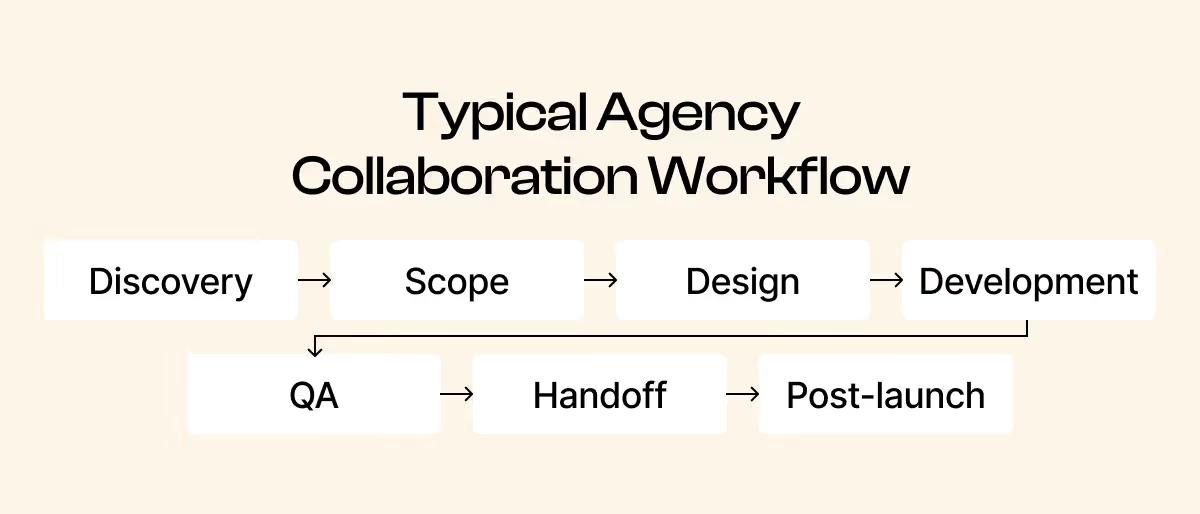
Then take a light first step: a quick message or a look at how they present themselves.
- Review their blog or resources
- Check how they explain their services
- Send a short inquiry to test responsiveness
Aim to narrow your list to 3–5 candidates for deeper evaluation.
Your progress is saved in this browser. Nothing is sent anywhere.
Webflow experience
There are a ton of Webflow agencies out there. Not every one of them is a fit for you. Here is what to check in a vendor’s experience.
Case studies with the functionality you need
Match on what the site has to do, not on the platform. Complex interactions and heavy animation are the parts that separate portfolios.
Functionality is where portfolios actually differ. A brochure site and a site carrying complex interactions are different projects, and heavy animation is the one most likely to be beyond a team that has only shipped the former.
Be sceptical of CMS claims. Every agency says it builds CMS-driven sites, and from the outside it is close to unverifiable: you cannot see how the collections are structured, or whether your marketing team could publish from them without a developer. Ask to be walked through a live one instead of taking the claim.
Ecommerce and memberships are rare enough in Webflow that most agencies, us included, will have little to show. If your build turns on either, look for a specialist. Ours are collected in our case studies, if you want a sense of what to ask for.
Work for companies like yours
Same industry, similar size, or the same funding stage. A direct competitor counts double.
In practice this is the first filter most companies apply, ahead of anything technical. A company that has just raised a Series C looks for a vendor who has built at that stage, because the problems are stage-specific: a bigger story to carry, more stakeholders to satisfy, and a sales team that did not exist a year ago.
Work for a direct competitor is the strongest signal available. It means the agency already understands your buyer, and you are not paying for that education.
Which layers they own: strategy, design, or only the build
Ask which parts of each project were theirs. The answer matters, and so does how directly they give it.
Webflow development on its own is close to table stakes now. AI has compressed the build, so the moat sits upstream: the strategy that decides what the site says, and the taste that decides how it looks. The useful question is not "did you build this" but "did you decide what it should be".
Portfolios mix built, designed, inherited and redesigned work without labelling any of it, so ask outright.
The narrower arrangement is legitimate too. Plenty of projects are a migration where an internal design team owns the look and the agency is hired for the build alone. If that is your setup, say so early: you are buying a narrower thing and should not be paying for the wider one.
Work that is still live and still maintained
Old projects since rebuilt elsewhere are worth asking about.
Clients leave for ordinary reasons. Ask about it before you read anything into it: a portfolio where nothing survived is the version worth understanding.
Ours is a case in point. Bland AI moved off Webflow onto an agentic stack so their own team could own inbound and ship faster, which was the right call for them. Being asked about it is fair. An agency that cannot answer the question straight is the actual signal.
Build quality
Check how their team works when no one is watching. Their own website is the one project with no client to blame. How much each of these matters depends on what you are building and who buys from you.
Fast Core Web Vitals on their own website
Run the agency’s own website, not a client’s, through PageSpeed Insights at pagespeed.web.dev. Look at LCP and CLS, on both mobile and desktop.
Client work always carries compromises the agency did not choose: a budget that ran out, a deadline that moved, a stakeholder who insisted on the video header. Their own website has none of that. Whatever you find there is the standard they hold themselves to.
Aim for LCP under 2.5 seconds and CLS under 0.1. Check mobile and desktop separately: the two often differ a lot, and mobile is usually the worse of the pair.
Based on guidance from

Layouts that hold at every screen size
Drag the browser window slowly from full width down to about 320px. Nothing should clip, overlap or vanish.
Designers pick a few screen sizes to work at: a phone, a tablet, a laptop. Sites usually look right at exactly those sizes and come apart in between, or at the very narrow end. Dragging the window slowly is how you find that in about thirty seconds.
How much it matters depends on your traffic. If most of your buyers arrive on a phone, treat it as close to critical. If you sell to enterprise teams working on desktops, it matters less.
Further reading

No sideways scrolling on mobile
Open a page on a phone and try to swipe it left and right. It should not move.
This is a common Webflow build error. Usually one element sits a little wider than the screen and drags the whole page with it.
Finding it does not automatically mean the agency was careless. If the client has been editing the site since launch, the overflow may well be theirs. Ask who has been maintaining the site before you count it against anyone.
Firefox’s developer tools flag the element causing it, which turns a guessing game into a ten-second check.
Based on guidance from
Images served in modern formats
Open the browser’s developer tools, reload a page, and look at what the images actually are. AVIF and WebP are current. JPEG and PNG are heavier.
Press F12 (fn + F12 on a Mac), open the Network tab, filter to images and reload. Five images across five pages is enough to see the pattern.
Images are usually the heaviest thing on a page, so the format is a large part of whether a site feels fast.
Based on guidance from

Focus you can see while tabbing
Press Tab repeatedly on one of their sites. A visible outline should move from link to link, and it should never slide underneath the navigation bar pinned to the top of the screen.
Anyone navigating by keyboard, people with motor disabilities, screen reader users, or anyone whose mouse has just died, tracks their position on the page by that outline. When it slides under a pinned navigation bar, they lose their place with no way to tell where they are.
WCAG names this directly: when something takes focus, it must not be hidden by other content on the page.
Webflow’s sticky navigation causes exactly this unless someone deliberately fixes it, so it reads well on whether the team finishes the parts nobody asks about.
Based on guidance from

Text that scales with the reader’s own font size
Change the default font size in your browser settings, then reload one of their sites. Text set in pixels will not move.
Almost nobody zooms a page to 200%. What people who need bigger text change is the default font size in their browser settings, once, and it applies to every site they visit.
Text sized in rems respects that setting. Text sized in fixed pixels ignores it completely.
Browser zoom scales everything, pixels included, so zooming hides the problem. Change the font size setting instead, then reload one of their sites.
Based on guidance from

Accessibility checked beyond an automated score
Ask what they check by hand, and which tools they use. A perfect Lighthouse score is where the work starts.
Automated scanners cover only part of what can go wrong. A score of 100 means the obvious problems are gone, not that the site works for everyone.
A team doing this properly will name most of these: an automated pass with Lighthouse or axe DevTools; tabbing the whole page with the keyboard; switching the stylesheet off to check the reading order still makes sense; validating the HTML; checking the heading outline; and viewing the page in grayscale to catch anything that relies on colour alone.
How much this matters depends on who you sell to. Government, education, healthcare and large enterprises usually treat accessibility as a procurement requirement, and failing it loses deals outright. Selling to small startups, it rarely comes up.
Based on guidance from

SEO built in
SEO is part of building the site. Two of these you can check yourself in a minute. The third you have to ask about.
Unique title tags on the sites they ship
Open five pages of a site they built and read the title on each one. The free SEO Meta in 1 Click extension shows each one without leaving the page.
Titles are among the cheapest work in a build, and SEO belongs in every build. So when titles are missing or duplicated on a site that has already shipped, what you are seeing is the level of detail the team worked at. Details were getting dropped somewhere.
Length matters more than most people think. In a study of 80,959 titles, Google rewrote about 61% of them, and titles over 70 characters were rewritten almost every time. Titles that matched the page’s H1 were rewritten far less.
Based on guidance from

Heading levels that follow the content
One H1, then H2s and H3s in the order the content actually nests.
Heading levels describe how a page is put together: what is a section, and what sits inside it. That is a semantic decision, made by the content.
The common mistake is picking a heading level for how big the text looks. We see it in Webflow builds from large agencies. If a heading needs to be smaller, that is a CSS change: the level stays where the content puts it.
Checking it takes a minute: SEO Meta in 1 Click lists a page’s full heading outline. Three H1s, or an H2 jumping straight to an H4, is the tell.
Headings are how people scan a page and how machines read its structure, so a broken outline costs you on both sides.
Based on guidance from
A straight answer on what happens to your rankings
Only if you are replatforming. Ask how they handle redirects, what they record before anything moves, and how much traffic they expect you to lose.
You cannot audit a migration someone else did. You will not know whether a site was ever replatformed, and third-party tools do not hold reliable before-and-after ranking data for a domain you do not own. What you are judging here is the answer itself.
Change the URLs, rebuild the templates, rebrand on top of it, and some ranking loss usually follows even when the redirect mapping, the baseline and the launch checks are all done properly. The work is to keep the dip small and short, and to know when it should recover.
Plenty of agencies will tell you otherwise. An agency promising no loss at all is either inexperienced or selling you something, and both cost you more than the honest version. Take the team that tells you roughly what the dip will look like and how they intend to shorten it.
A team that has done this before will also have a list of what they check the moment the new site goes live: robots.txt, canonicals, meta robots, redirect chains on the top landing pages, tracking, the XML sitemap.
Based on guidance from

Process and communication
The projects we have watched fail came apart on process and coordination. The work itself was usually fine.
A documented workflow you can see
Stages, what happens in each, and what they need from you at each one.
Ask to see the actual document. What you want named is the stages, what gets produced in each one, who signs it off, and what they need from you before the next stage can start: usually content, access, or a decision.
A written process survives pressure. When a deadline moves or someone leaves, the team still knows what happens next and so do you. A process that only lives in conversation quietly changes shape, and you find out at the point where you had assumed something was already done.
It also shows you where you are the bottleneck. Most projects that slip are waiting on the client for content or approvals, and a written workflow makes that visible early enough to do something about it.
A team that has launched sites has a list and will read it to you. Vagueness here is the clearest warning you get before signing.
Ours is public if you want something to compare against: 61 checks across pre- and post-launch.
Based on guidance from

A named point of contact and a set check-in cadence
One person who owns the project, and a fixed day each week when you hear from them.
Projects drift. Someone waits on an answer, a task slips a few days, and nobody raises it because nothing has technically gone wrong yet.
A fixed weekly slot catches that while it is still days instead of weeks. Overcommunicating costs an hour. Finding out in week six that week three went sideways costs the timeline.
Ask who the person is by name, and what happens when they are away.
A clear route for feedback and revisions
How you give notes, how many rounds the price covers, and what an extra round costs.
Revisions are part of every project. The arguments start after the work is done, when it turns out nobody agreed what was included.
Get three things in writing: how notes are collected, how many rounds the quote covers, and the price of one more. Feedback consolidated in one place also saves you a round on its own: notes arriving by email, Slack and phone call over four days get half-applied.
Proof you can check
The reviews take five minutes. The references take a phone call, and are worth it.
Reviews somewhere the agency does not control
Clutch, DesignRush, G2 or Trustpilot. Read the score, the number of reviews behind it, and how recent they are.
Quotes on an agency’s own site are chosen by the agency. A rating on a third-party platform carries a count and a date, which is what lets an outsider weigh it.
A 5.0 from three reviews two years ago and a 4.7 from sixty in the past year are very different signals, and the second one is the stronger of the two.
Ask for two references
Two clients you can speak to. Ask each of them what went wrong and how it was handled.
One reference is a friend. Two is a pattern.
Something goes wrong on every project. What you are listening for is what happened next: who raised it, how quickly, and whether the fix came out of the client’s budget.
Then ask whether they would hire the agency again for the same work. That one is harder to answer politely than “were they good”, which is what makes it useful.
We were asked for exactly this recently. We put forward two people from Chili Piper: one who has since moved on, and one still there. The person who has left is usually the more useful call, because they have no reason to be diplomatic. Any agency that is comfortable with its work will hand over both without flinching, and hesitation here is itself an answer.
Whether they have capacity to manage the site after launch
Ask directly: can the team that builds it also run it, and do they have the capacity to take that on?
Plenty of companies want a build and nothing more, and that is a perfectly good answer from either side. Ask anyway, so you know before the build rather than after.
If you do want ongoing work, ask what else that team is currently running. An agency that builds well and is already at capacity is the wrong fit for the second job.
Terms, before you sign
Get these in writing before money moves. Cheap to agree now, expensive to argue later.
A fixed quote with change-order pricing spelled out
What an extra page costs, and what counts as a change.
Scope changes on nearly every project. The dispute only happens when the price of a change was never agreed.
Ownership of the project, domain and assets in writing
Name each item and who holds it on launch day.
Six separate things, and agencies routinely hold some of them: the Webflow project itself, transferred to your workspace rather than living in theirs; the Webflow site plan, billed to your card; the domain, registered in your name at your registrar; the design files; any custom code written for you; and your analytics, with GA4 and Search Console owned by your Google account.
Each one is free to agree now. Each one is leverage if you ever want to leave. If any answer is not "you own it", find out exactly why before you sign.
Who configures cookie consent and handles form data
Webflow covers the hosting, SSL and platform patching. This part it does not.
Platform security is Webflow's job and they do it well. What still needs an owner is your cookie banner and consent setup, where form submissions are stored and who can read them, and any third-party scripts added to the site.
What Are the Red Flags When Hiring a Webflow Agency?
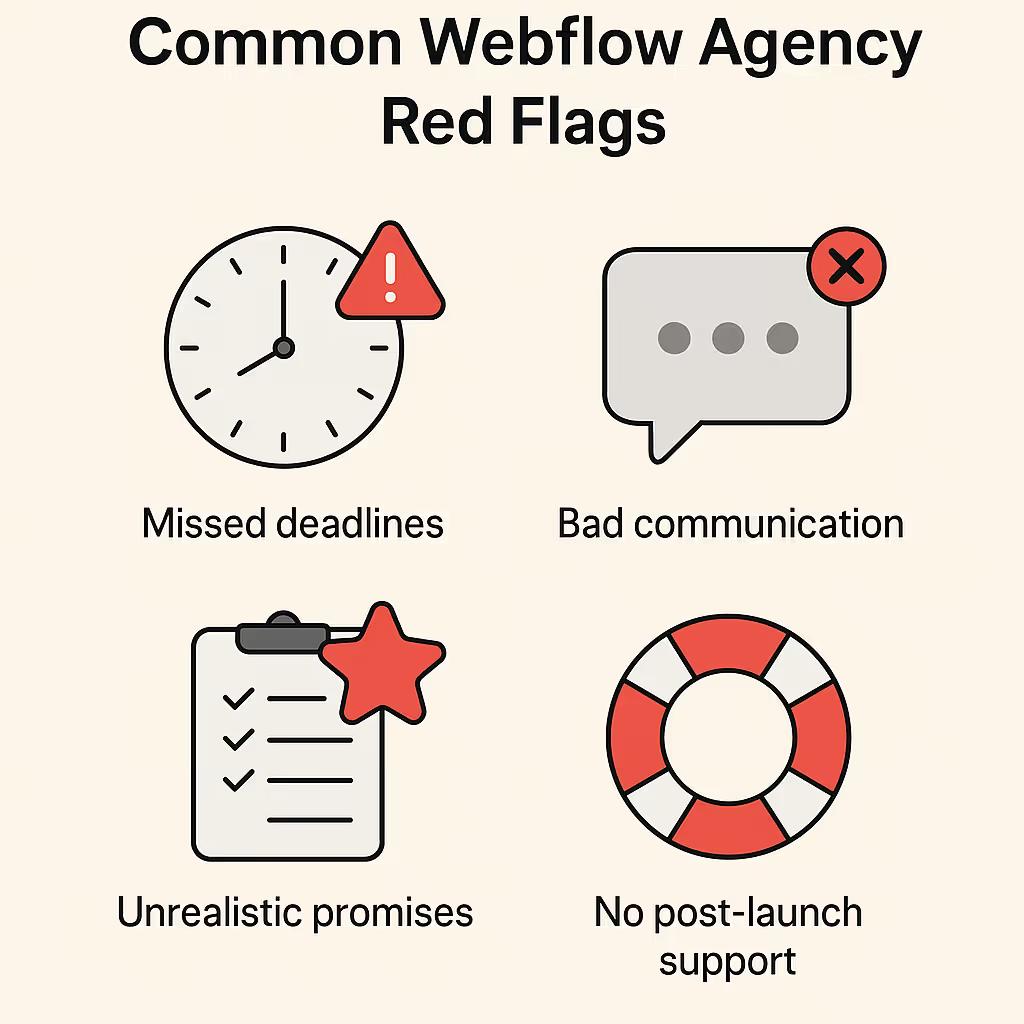
Five signals predict a bad build before you’ve signed anything: no case studies, no defined process, inconsistent communication, unrealistic promises, and no post-launch plan.
No Case Studies, Reviews, or Client References
If they won’t show past results or put you in touch with a previous client, you’re taking a risk.
- Do they only show generic visuals with no performance data?
- Are they unwilling to share client references or send you to public reviews?
- Are the examples outdated or overly templated?
- Can they speak confidently about past results?
No Defined Process
A vague or ad-hoc approach now means misalignment later.
- Can they walk you through how they run a project?
- Do they skip discovery or assume requirements without asking?
- Do timelines and phases feel improvised?
Poor or Inconsistent Communication
How they communicate before the sale often reflects what comes after.
- Slow, unclear responses
- Overly salesy replies with little substance
- No curiosity about your goals or constraints
Unrealistic Promises
When timelines or pricing seem too good, they usually are.
- Fixed price for a large scope with no buffer
- Aggressive deadlines with no questions asked
- Promises of "unlimited revisions" without constraints
No Post-Launch Plan
Launching the site isn’t the finish line.
- Is there no mention of support or maintenance?
- Do they disappear after delivery?
- Is ownership and access handoff vague?
Spotting these signs early can save you budget, time, and frustration down the road.
How Do I Interview, Compare, and Choose a Webflow Agency?
Closing the decision takes four steps: discovery calls that show how they think, hard questions that surface how they handle problems, a proposal comparison that catches what the sales conversation glossed over, and a final gut check on fit.
Schedule Discovery Calls
Treat the call like an interview. Watch how they ask questions, explain their thinking, and respond to uncertainty.
- Do they ask good questions about your business and goals?
- Can they describe how they’d approach your project?
- Do they talk about process clearly and without fluff?
- Are they transparent about who will be doing the work and how they’ll stay involved after the sale?
- Do they acknowledge trade-offs and constraints, or only talk in generalities?
- Does their team culture feel aligned with yours in terms of pace, tone, and working style?
Ask the Hard Questions
Push past polished sales talk to understand how they handle real problems.
- How do you handle timeline delays or missed milestones?
- How do you manage scope changes and communication if feedback is slow?
- What’s your policy on ownership and access to files and accounts?
Review Proposals in Detail
Compare proposals item by item. Look for named deliverables, dates and numbers.
- Are timelines realistic for your internal process?
- Is anything vague or left undefined?
- Are the people you met on the call the ones who’ll do the work?
Evaluate Fit
Check for communication style, clarity, and overall reliability.
- Did they listen, or just pitch?
- Did they explain their reasoning clearly?
- Can you see this team communicating well with yours?
If something feels off, it probably is. Make the call on what you saw and heard. If you want to see how we answer these same questions, our Webflow development agency page lays out our services, process, and client work.
Frequently Asked Questions About Hiring a Webflow Agency
Why choose a Webflow agency instead of a generalist web agency?
A Webflow-focused agency has already hit the platform's limits on someone else's project, not yours. That means fewer patchwork fixes and faster builds. Full case in Why Hire a Webflow Agency?
How much does it cost and how long does it take to hire a Webflow agency?
Budget a few thousand dollars for a simple site up to $30K+ for complex, integration-heavy builds, and three weeks to a few months depending on scope. Compare what each price point actually includes, in Cost of Building a Webflow Website: DIY vs Freelancer vs Agency.
What's the biggest red flag when evaluating a Webflow agency?
They won't name a past client or let you talk to one. Portfolio screenshots and quotes on their own site are easy to produce. A call with an actual client isn't.
How many Webflow agencies should I request proposals from?
Three gives you enough to compare approach, pricing, and communication style. Past five, you're comparing noise.
Does a Webflow-certified partner badge matter?
It's a decent tiebreaker: certified partners get direct Webflow support access and early features, which can matter on complex builds. It doesn't replace checking their portfolio and calling references.
Will I own the Webflow project and assets after launch?
Yes, and your contract should say so explicitly: you own the project, code, and assets once it's paid for and live. An agency that won't put that in writing is showing you the same red flag as refusing client references, just earlier.
What should I prepare before approaching a Webflow agency?
Your goals, a rough budget, a timeline, and technical must-haves (CMS structure, integrations, existing brand assets). A one-page brief and 2-3 reference sites you like saves both sides a round of guessing.
Can a Webflow agency help with content or SEO?
Ask directly. Some Webflow agencies handle it in-house; plenty refer it out. Confirm which one you're getting before you sign.
Share the Article
Evgenii Tilipman is the founder of Khod, a digital agency helping B2B tech companies turn their websites into demand-generating assets.
He works closely with founders and GTM teams to define positioning, structure high-converting pages, and build scalable Webflow systems that support growth.
Before founding Khod, Evgenii led Webflow development at an agency and worked with Memberstack to build products for the Webflow community. He has since supported teams from seed to Series C across positioning, conversion, and Webflow development.
Outside of work, he's a husband, dog dad, and someone who treats his health and long hikes with the same consistency he brings to his projects.
Table of Content


Kickstart your project today!
Book a call to discuss your goals and how we can help you reach them.
See Khod First on Google
Explore Related Articles
Website Strategy • Sep 10, 2026 • 15 min read
8 Best Webflow Agencies for AI Startups in 2026
Tool Comparisons • Jul 29, 2026 • 10 min read
Webflow vs Next.js: Pros, Cons, and How to Decide
Tool Comparisons • Jul 14, 2026 • 13 min read
Webflow vs Custom Code: Pros, Cons, and How to DecideYour Next Deal Starts With Your Website
Most deals are won or lost before your sales team gets involved. Let's make sure your site is ready for that moment.
