
Resource Center / Articles / Webflow vs Sanity: Which One Fits Your Team?
Webflow vs Sanity: Which One Fits Your Team?
 Evgenii Tilipman • Sanity • Published on Oct 27, 2026 • Updated on Oct 27, 2026 • 13 min read

TL;DR
Webflow vs Sanity is a choice between a website builder and a content backend. Webflow runs 0.8% of all websites according to W3Techs, and it ships design, CMS and hosting as one product. Sanity stores your content and leaves the website to a framework your developers build.
- Pick Webflow when designers build new layouts every week and nobody on the team wants to own code or hosting.
- Pick Sanity when the same content appears on many pages, you need content types Webflow's Collections can't hold, and a developer or an agency will look after the site.
- Cost: a team of five marketers and a developer pays about $119 a month on Webflow and about $110 on Sanity with Vercel. The build is the bigger number on both.
- Time: we moved khod.io, 180+ pages, from Webflow to Sanity in under three weeks. Most marketing sites take two to six weeks on either platform when the design already exists.
- Lock-in: Webflow exports static code and CSVs, and an export can't go back in. Sanity's editor is open source and its content exports with one command.
What's the difference between Webflow and Sanity?
Webflow is a hosted website builder. You design pages on a visual canvas, store content in Collections, and publish to Webflow's hosting, all inside one product and one bill.
Sanity is a headless CMS. It holds your content as structured data in its hosted Content Lake and gives editors Sanity Studio to edit it. The website itself is a separate project, usually built with Next.js or Astro and hosted on a platform like Vercel. Our guide to what Sanity CMS is covers how the pieces fit together.
That split decides most of what follows. With Webflow you're buying a finished tool. With Sanity you're buying a content system and commissioning the website around it.

We build on both. We're Webflow Certified Partners, most of our client sites run on Webflow, and in June 2026 we rebuilt our own site on Next.js, Sanity and Vercel. Everything below comes from running the two side by side.
Webflow vs Sanity at a glance
Who builds pages in Webflow and Sanity
This is the question we ask first on every strategy call, because it settles the choice faster than any feature list.
Editing in Webflow
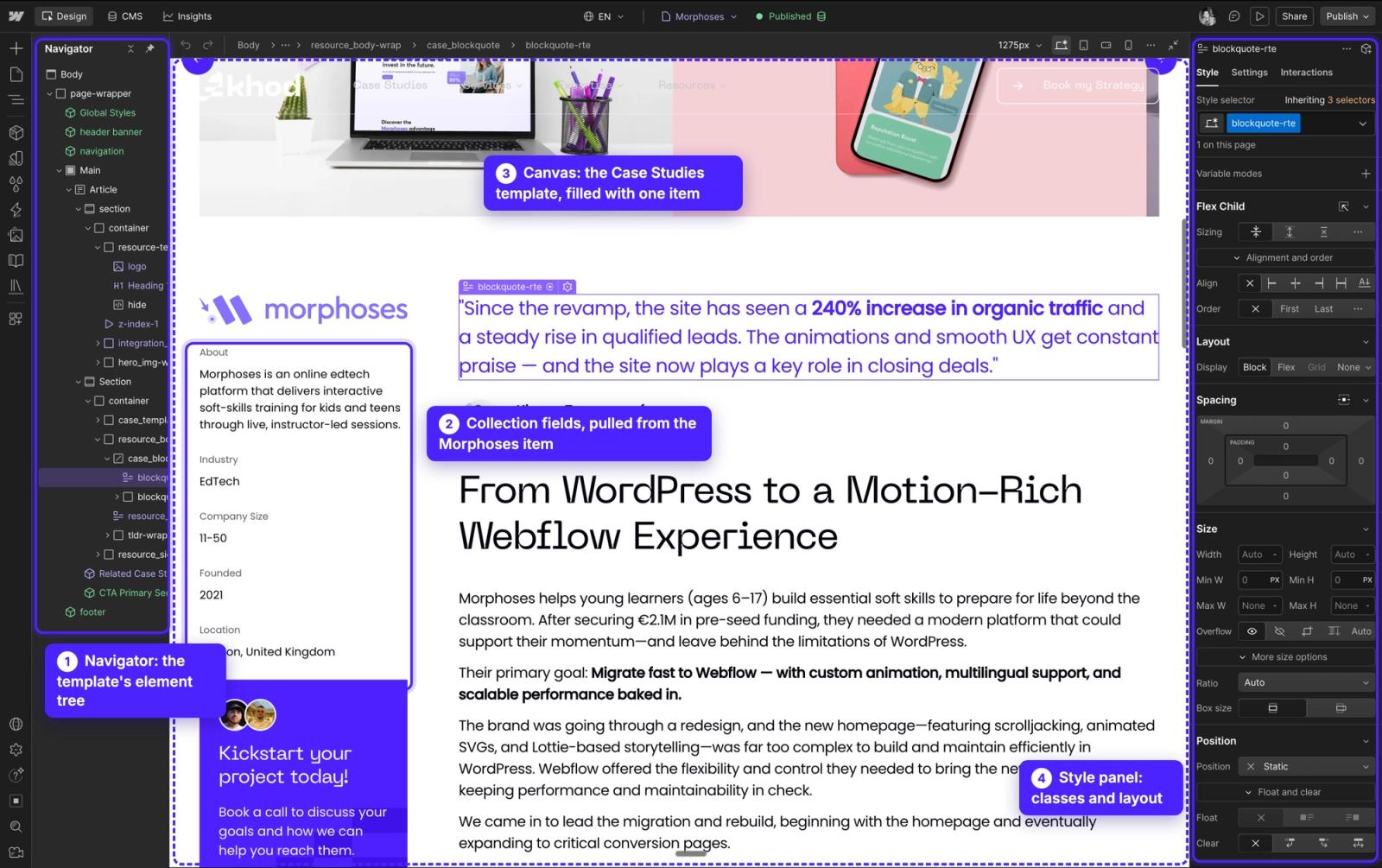
Webflow puts the editor and the designer in the same place. A designer can draw a layout nobody has built before, wire up an interaction and publish it the same afternoon. Marketers on Limited seats edit copy and build pages from components the designer has set up.
The trade is that the canvas has few guardrails. Anyone with design access can move a section out of line, which is why Webflow's higher plans add publishing workflows and design approvals.
Editing in Sanity
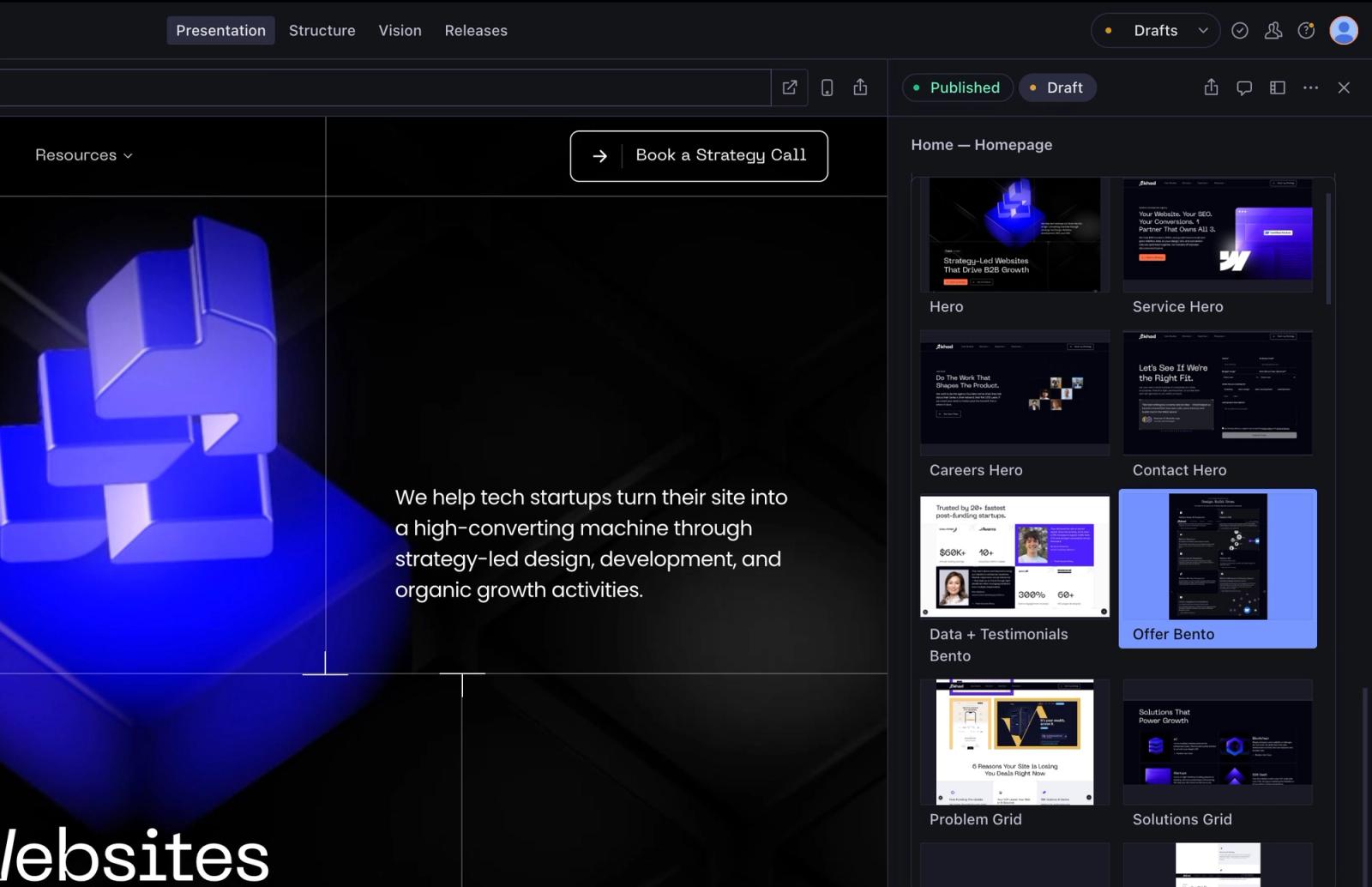
In Sanity, a developer defines each kind of section once: a hero, a pricing table, a case study card. Editors then build pages by picking sections, filling in fields and checking the live preview next to them.
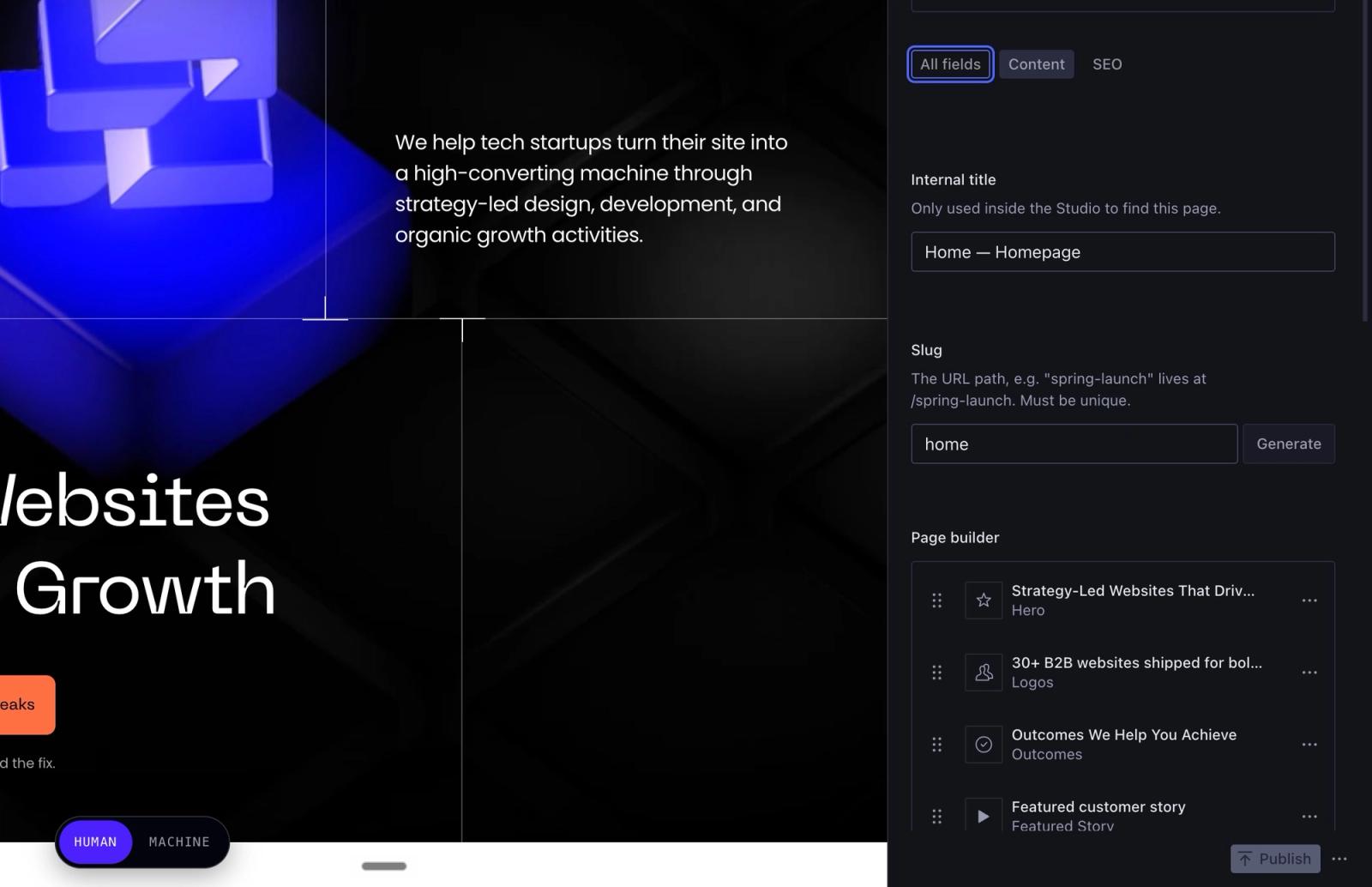
Sanity's Presentation tool lets them click any text on the preview to jump to the field behind it.

Our own site has about 50 section types. In its first months on Sanity, 20 new pages went live on it as Sanity documents, from articles to case studies, without a developer touching layout code. A layout nobody has built before still starts as a developer task, and once it exists it's one more section in the list.
When The Accountant Quits asked us to move their site off Webflow, they wanted to keep Webflow's build mode: new pages assembled from existing components, with no free-form canvas to break by accident. Sanity's editor does that by design. The case study covers how the handoff worked.
The practical rule is simple: if your designers build new layouts every week, Webflow fits. If your marketers build pages from sections you already have and AI agents do the build work, Sanity fits, and it keeps those pages on-brand.
Content modeling: Collections vs schema in code
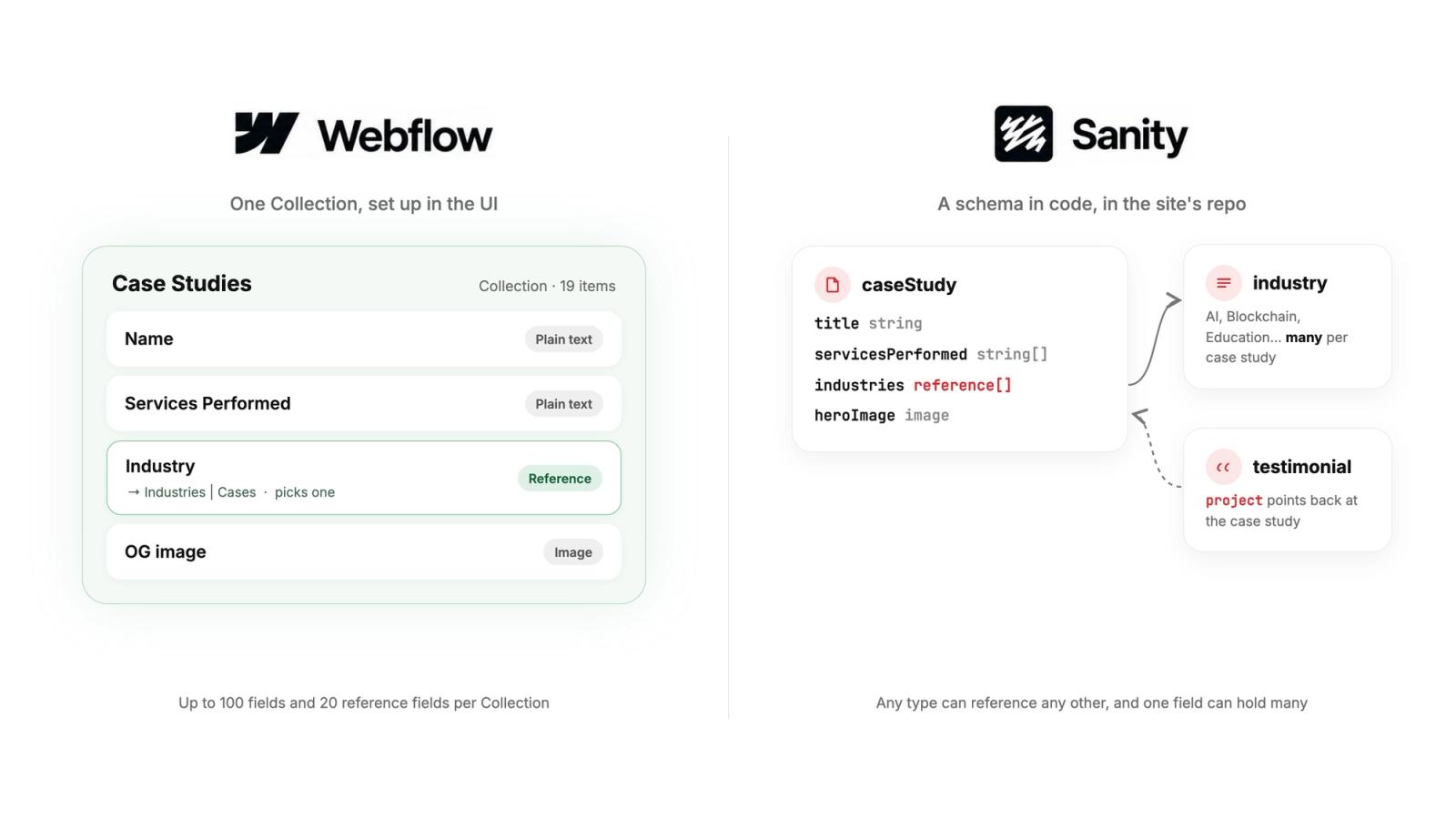
Webflow stores content in Collections that you set up in the UI. Each Collection takes up to 100 fields and 20 reference fields, and the total number of items is capped by plan. For a blog and a case study library, that's plenty.
The limits show up when content starts to relate to other content. An integrations library where each entry links to categories, partners, case studies and FAQs runs into the reference cap. A site past its item cap has one step up, Webflow Enterprise, which has started around $25,000 a year in the client quotes we've seen.
Sanity defines content types in code, in the same repository as the website. A type can reference any other type, a reference field can hold many items, and a developer can add a new content type in an afternoon. Rich text is stored as Portable Text, structured data that your front end renders with your own components, so a pull quote or a code block in an article looks the same on every page.
The cost of that freedom is that someone has to design the model. On our own rebuild, most of the Sanity work went into the content model; installing the Studio took minutes.
What Webflow and Sanity cost
Both have a free tier, and both bills grow with your team. Prices below are list prices, billed yearly, checked in October 2026.
Webflow lists every site plan, Workspace plan and seat price on its pricing page. A site needs both a site plan and a Workspace, and our Webflow pricing guide explains how the two combine.
Sanity's pricing page lists the Free plan's caps. They're hard caps: past them the API stops answering until the month resets, so a busy site moves to Growth.
To price your own team, our Sanity pricing calculator itemizes the monthly bill from your seats, documents and traffic.
Two bills from our own work: khod.io runs on Sanity's Free plan, and The Accountant Quits left Webflow's Business plan before its renewal date.
The running cost is the small line. The one-off build is the large one, and it's similar on both platforms for a site of the same size and design.
How long Webflow and Sanity take to launch
A marketing site of 20 to 40 pages takes us two to six weeks on either platform when the design already exists, and six to ten when we design it too. Where the two differ is in what fills those weeks.
On Webflow, the design and the build happen in the same tool, so the first pages appear early and the time goes into Collections, interactions and content entry. On Sanity, the first week or more goes into the content model and the section types before a page looks finished, and the time saved later is in content entry and every page after launch.
Our own move ran from June 16 to July 4, 2026, for 180+ pages, with AI agents writing most of the code while our team directed and reviewed it. The Accountant Quits, a 118-page site, moved from Webflow to Astro and Sanity in about a week. We wrote up the first three months on Next.js, Sanity and Vercel, including what broke.
SEO, page speed and AI search
Both can rank. Webflow hosts static pages on a CDN, gives you control of titles, canonicals, redirects, robots.txt and schema markup, and adds AEO tools on its higher plans.
On Sanity, SEO depends on how your developers build the front end. Ours renders every page on the server, so search engines and AI assistants get the complete page on the first request, and titles, descriptions and structured data are filled in from the content automatically. Each page also publishes a plain Markdown version for AI crawlers.
Speed comes down to what runs on the page more than the platform. On PageSpeed Insights (mobile, six runs each, median, October 27, 2026), our old Webflow build scored 81 and khod.io on Next.js scored 76. khod.io shows its first content in 1.7 seconds against 3.0 on Webflow, but it also loads analytics and our interactive website teardown, which the old build never had, and that extra script is where its score goes.
AI agents and MCP
Webflow and Sanity both run MCP servers, which let an AI assistant read and write your site. We use both on client and internal work.
On Webflow, the MCP server edits pages, styles and Collection items, and Webflow AI drafts sections and copy inside the Designer. On Sanity, agents write into drafts through the API, and a person reviews the change in Studio and publishes it. Every edit shows in the document history, so any change can be rolled back.
The difference is in what an agent can change. On Sanity, the website is code in a repository, so an agent can also build a new section type, fix a schema or update content across a hundred pages in one pass. That's why we moved our own site, and our post on why we moved off Webflow explains the reasoning.
Who owns the site, and what happens if you leave
Webflow lets you export your site's code on a paid Workspace plan. The export is static HTML, CSS and JavaScript; Collection content comes out as CSV, one Collection at a time; forms stop working; and an exported site can't be imported back.
With Sanity, the website code lives in your repository and the content lives in your own Sanity project. Sanity Studio is open source, and the whole dataset exports with one command, sanity dataset export. Any developer who knows Sanity can pick the project up.
On security, Webflow holds SOC 2 Type II and ISO 27001 and handles hosting, patches and DDoS protection for you.
Sanity's content platform is SOC 2, GDPR and CCPA compliant, and your host covers the website itself, with Vercel or a similar platform handling patches and DDoS protection.
Both companies are venture-backed. Sanity raised an $85 million Series C in May 2025 and reported more than $40 million in annual recurring revenue for 2024 and 30,000+ organizations on the platform, according to CMSWire. If the vendor ever changes course, Sanity's open-source Studio and full dataset export are what keep your content portable.
When to choose Webflow, and when to choose Sanity
Choose Webflow if your team is design-led, ships new layouts often, and wants one tool with hosting included. It's the right call for most marketing sites we build, and our Webflow development work is still the larger part of what we do.
Choose Sanity if your content has structure, your marketers build pages from a set of sections, and AI agents write most of the code while a developer or your agency reviews it. It suits B2B sites with case studies, integrations, docs and resource libraries that reference each other, and content that has to reach more than the website. Ours already goes to two places: every page on khod.io also publishes a plain Markdown copy for AI crawlers from the same Sanity content.
Should you build on Webflow or custom code?
Six questions about the website you actually want, and what it has to do for your go-to-market. We'll tell you which stack gets you there.
Moving from Webflow to Sanity
A move from Webflow to Sanity is a rebuild of the front end and a remodel of the content. Collections export as CSV, but rich text, references between Collections and every static page need mapping into the new content model, and every indexed URL needs a redirect to its new address.
Our Webflow to Sanity migration page covers the steps, timelines and pricing for that move.
Why we build on both
We started as a Webflow agency and we still recommend Webflow to most design-led teams. We moved khod.io to Sanity because our team builds with AI agents, and agents work best on a codebase with structured content.
Neither platform is the better one in general. The right one is the one your team can run a year from now, and we'll tell you on a call which one that is for your site.
If you're leaning toward Sanity, our Sanity agency page shows how we build it, what it costs and how long it takes.
Frequently asked questions
Is Sanity better than Webflow?
For structured content that appears on many pages, yes. For a design-led site where new layouts ship every week, Webflow is the better fit. The deciding question is who builds new pages on your team.
Is Webflow a headless CMS?
Webflow is a website builder with a built-in CMS. It has APIs that let other sites read Collection content, and Webflow Cloud hosts web apps next to a Webflow site. Webflow sells it as an all-in-one platform, and that's how we build on it.
Can marketers edit a Sanity site without a developer?
Yes, for everything built from existing sections: copy, images, new pages, page order and publishing. A new kind of section is a developer task, and once it exists, editors use it like any other.
Is Sanity free?
Sanity's Free plan costs $0 with no time limit and covers 20 seats and 10,000 documents. Its limits are hard caps; paid plans start at $15 per seat a month.
Can you use Sanity and Webflow together?
Yes. You can keep the marketing site on Webflow and use Sanity for content that also feeds an app or a docs site. It means running two content systems, so we only recommend it when the second channel exists.
Which is better for SEO, Webflow or Sanity?
Both can rank well. Webflow gives you SEO controls out of the box. On Sanity, SEO depends on the front end; a server-rendered Next.js or Astro site gives search engines the complete page on the first request.
How long does a Webflow to Sanity migration take?
Two to six weeks for most marketing sites when the design stays, and six to ten with a redesign. Our own 180+ page site moved in under three weeks.
What do Webflow users on Reddit say about Sanity?
In r/webflow, the reasons people give for leaving Webflow are item limits and price; one poster hit the 10,000-item cap and couldn't justify Enterprise. Sanity comes up as a destination, alongside warnings that it's venture-backed like Webflow.
Share the Article


Webflow or Sanity for your site?
We build on Webflow and on Sanity, and we run our own site on Sanity. Tell us who edits your site and we'll tell you which one fits.
See Khod First on Google
Evgenii Tilipman is the founder of Khod, a digital agency helping B2B tech companies turn their websites into demand-generating assets.
He works closely with founders and GTM teams to define positioning, structure high-converting pages, and build scalable Webflow systems that support growth.
Before founding Khod, Evgenii led Webflow development at an agency and worked with Memberstack to build products for the Webflow community. He has since supported teams from seed to Series C across positioning, conversion, and Webflow development.
Outside of work, he's a husband, dog dad, and someone who treats his health and long hikes with the same consistency he brings to his projects.
Table of Content
Webflow or Sanity for your site?
We build on Webflow and on Sanity, and we run our own site on Sanity. Tell us who edits your site and we'll tell you which one fits.
See Khod First on Google
Explore Related Articles

Sanity • Oct 20, 2026 • 10 min read
Sanity Pricing in 2026: Plans, Overages and Monthly Bills
Sanity • Oct 20, 2026 • 11 min read
What Is Sanity CMS? How It Works and What It Costs in 2026
Tool Comparisons • Oct 19, 2026 • 19 min read
Astro CMS: Choosing a CMS for Your Astro Marketing SiteYour Next Deal Starts With Your Website
Most deals are won or lost before your sales team gets involved. Let's make sure your site is ready for that moment.
