
Resource Center / Playbooks / The B2B SaaS Website Audit Checklist: 10 Places You're Quietly Leaking Demos
The B2B SaaS Website Audit Checklist: 10 Places You're Quietly Leaking Demos
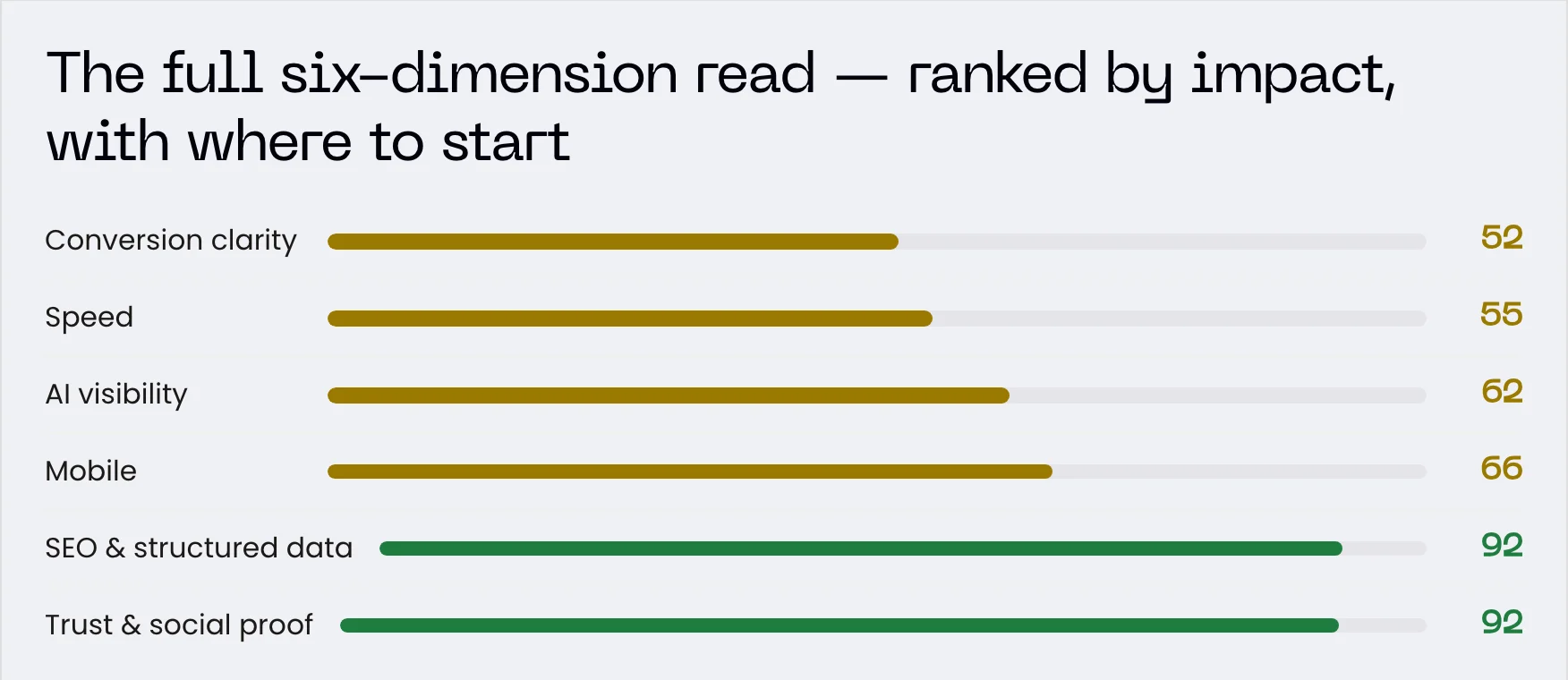
An interactive audit of the 10 places B2B SaaS sites lose demos. The Demo Leak Teardown checks the first six categories on your URL in about two minutes; the last four need your logins.
Published Jul 10, 2026 • Last updated Sep 15, 2026


TL;DR
Every leak on this checklist costs demos from traffic you already paid for. The audit runs to 48 checks across 10 categories, in two parts:
- What anyone can see: speed, primary CTA, mobile, SEO and structured data, AI visibility, and trust. You need public tools, a free crawler and your phone, with no logins. The Demo Leak Teardown checks these six categories on your URL in about two minutes.
- What only you can see: analytics, forms and lead delivery, crawlability, and content depth. Each one needs a login to Search Console, your analytics or your CRM, so no outside tool can check them.
Run the Demo Leak Teardown on your site for free, and it ranks the leaks in the first six categories by what each one costs you.
A technical audit tells you what is broken. It does not tell you what it is costing you. Robots.txt, alt text and sitemap XML can all be perfect while your demo requests stay flat.
This checklist is split by who can run each check:
- What anyone can see: six categories you can check on any URL with public tools, a free crawler and your own phone. These are the six categories the Demo Leak Teardown scores.
- What only you can see: four categories that need a login to Search Console, your analytics, your CRM or your form inbox.
Still building the site? Start with the website launch checklist and come back here once it is live.
Tick each task as you go. Your progress is saved in this browser, so you can close the tab and come back to it. Each task opens to show why it matters and which practitioner the advice comes from.
Your progress is saved in this browser. Nothing is sent anywhere.
What Anyone Can See
29 of 48 checks · 6 categories
Speed and Core Web Vitals
A slow first load reads as broken before anyone reads your pitch. The Teardown pulls Core Web Vitals where Google has field data and falls back to response time and page weight.
Attribute the slowdown to one page and one metric
Name the slow page, the Core Web Vital it fails and its field value from PageSpeed Insights.
A founder or a board acts on a sentence like this: the pricing page fails Largest Contentful Paint for visitors on phones. Calibre's Karolina Szczur advises keeping the jargon and the number of metrics low when you present speed findings to decision makers.
Find the page and the metric
- Run the page you care most about in PageSpeed Insights, starting with pricing or demo request.
- Read the field data at the top of the report, which comes from Chrome users over the previous 28 days.
- Check whether the report shows data for this URL or for the whole origin. Low-traffic pages fall back to the origin figure.
- Pick the Core Web Vital furthest outside the good range and write down its value.
Write the finding in one sentence
Page, metric, value, device. For example: pricing, Largest Contentful Paint, 4.1 seconds, mobile. Keep the performance score out of the sentence; the metric tells the team what to fix.
Based on guidance from

Split the field data by device
PageSpeed Insights reports mobile and desktop field data separately. Read both before deciding what to fix.
Core Web Vitals reported as a single figure average a desktop that passes with a phone that fails. Split by device before drawing any conclusion.
What the field data covers
- CrUX segments by device type: phone, tablet and desktop. PageSpeed Insights shows mobile and desktop.
- The window is a rolling 28-day aggregate, so a fix you shipped last week is not in it yet.
- Where a URL has too little traffic, PageSpeed Insights shows the origin figure instead. Note which one you are reading.
Where Khod puts the weight
Our call for B2B sites: a failing mobile result on any page that LinkedIn posts or sales emails link to gets fixed first, because anyone tapping that link in the LinkedIn app is on a phone. On pages buyers reach from search at their desk, desktop gets the weight.
Based on guidance from

Identify what is delaying LCP
Name the largest element and the thing blocking it: hero media, a render-blocking font, or a script.
Largest Contentful Paint breaks into four stages, and each points at a different fix. Find the stage that takes longest before optimising anything.
The four subparts
- Time to First Byte, how long the server takes to start sending the document.
- Resource Load Delay, how long before the browser discovers the LCP image.
- Resource Load Duration, how long that image takes to download.
- Render Delay, how long between having the element and painting it.
If the LCP element is not an image, load delay and load duration are zero and render delay carries the whole cost. Look at render-blocking resources and JavaScript-generated content first.
Based on guidance from

Count third-party scripts loading before content
List every chat widget, tracker and embed that loads before your own content, with who added it.
Start with a list: every third-party domain the page requests, what each one does and who asked for it. Bring that list to the team that added each tag before you ask them to remove it.
Build the list from the browser
- Open the page in Chrome, open DevTools, go to the Network tab and reload.
- Sort by domain and note each one that is not yours.
- Mark the ones that load before the hero appears, and put an owner next to each.
Why they cost more than their file size
Render-blocking CSS or synchronous JavaScript served from someone else's domain puts your start-render time on their infrastructure. Critical assets are too valuable to leave on servers you do not control.
Based on guidance from

Test the pages closest to a sale
Run pricing, demo request and your main service page through PageSpeed Insights, one URL at a time.
PageSpeed Insights tests a single URL at a time. The pages a buyer opens just before booking a demo need their own run.
The pages to test
- The homepage.
- The main service or product page.
- Pricing or the demo request page.
- The article you link to most.
Reading the results
- Check the mobile and desktop tabs for each URL.
- Khod's call: pages built on the same template share most of their problems, so one URL per template stands in for the rest.
Based on guidance from

Primary CTA and Conversion Clarity
Each page gets one clear next step. The Teardown reads every button label on the page against what that page is for.
Count the primary actions above the fold
Two or more equally strong buttons at the top of a page split the visitor's first click.
Decide the one action each page exists to get, then check the top of the page shows it as the strongest button. When four buttons share the same size and colour, the visitor has to rank them before doing anything.
What extra choices cost
Unbounce calls this attention ratio: the number of things a visitor can do on a page compared with the number of things they should do. Unbounce puts the highest-converting landing pages at 1:1, and its analysis of more than 20,000 lead gen landing pages found conversion rates fell as the number of links rose.
How to check
- Screenshot the homepage, the main service or product page and the pricing or demo page at 1280px wide.
- Count the clickable elements above the fold, then count the ones that lead to your main conversion.
- Unbounce recommends reserving the boldest colour on the page for calls to action. Check the main button's colour appears on nothing else.
- If the top of the page offers more than one path forward, pick the one tied to revenue and turn the others into text links or remove them.
Based on guidance from
James Dixon
Author @ Unbounce
Match the CTA to where the page sits in the funnel
Check each main page asks for the step its visitor came ready to take, from reading to booking.
Open the homepage, the main service or product page, pricing or demo request, and the article you link to most. For each one, write down what a visitor clicked to get there and what the page body asks them to do.
Read the click, then set the ask
Andy Crestodina of Orbit Media puts the rule plainly: if the click shows the visitor expected content, do not expect them to convert into a lead, and if it shows interest in a specific service, do not ask them to subscribe.
How to fix a mismatch
- On articles and guides, ask for a step that fits reading: a newsletter, a related guide or a case study.
- On pricing and service pages, make the call or demo the main button.
- Crestodina recommends secondary actions for visitors not ready to contact sales, such as a guide, case studies or a demo. Add one below the main button on sales pages.
- Leave the site-wide action in the nav as it is. This check covers the ask inside the page body.
Based on guidance from

Audit the wording of every CTA
"Learn more" says nothing about the click. Each label should name what the visitor gets or what happens next.
A button label tells the visitor what happens after the click. "Learn more", "Submit" and "Click here" leave them to guess.
What Copyhackers recommends
Joanna Wiebe of Copyhackers says "Learn more" is common enough to be white noise. Her fix is a call to value: finish the sentence "I want to..." with what the visitor wants, and use that as the label. She also warns that any hint of effort on a button, such as signing up or buying, lowers its conversion rate.
At the bottom of the funnel, where the visitor is completing a booking or a purchase, Wiebe keeps plain action labels such as "Complete booking", because the visitor knows exactly what happens next.
How to check
- List the button labels on the homepage, the main service or product page, pricing or demo request, and your most-linked article.
- Mark any label that could sit on any site, and cut words that signal work or risk, such as "Sign up" or "Buy".
- On pages where the visitor is still deciding, rewrite marked labels as calls to value, such as "See pricing for a 10-person team".
- On the form or booking step, use a plain label that says what the click completes, such as "Book the call".
Based on guidance from

Check nav and footer agree with the page
The nav holds one site-wide action. Check it reads the same everywhere and each label says what happens next.
The nav button carries the site-wide action, such as Book a demo, on every page. The page body can ask for a smaller step that fits the page, such as a guide on an article. This check covers two things: the site-wide action keeps one label everywhere, and each label says what happens after the click.
What Smashing Magazine recommends
Nick Babich writes that the navigation system should be the same for all pages on a site, and that the label on any actionable element should tie back to what it will do for the user. Users associate an element's shape with button behaviour, so a button keeps the same shape wherever it appears.
The audit
- Open the homepage, the main service or product page, pricing and one article. Write down the nav button label, the footer button label and the main button label in the page body.
- Confirm the nav and footer show the same site-wide action, with the same wording and button style, on all four pages.
- Where the body asks for a smaller step, check its label names that step, such as Get the guide, and does not reuse the site-wide label for a different destination.
- If two different labels lead to the same page, keep the one that says what the visitor gets and change the other.
Based on guidance from

Walk the path from top landing page to conversion
Walk from each main entry page to the form and mark each step where the next click is unclear.
Start from the pages a buyer lands on first: the homepage, the main service or product page, pricing or demo request, and the article you link to most. Walk each one to the contact form or booking page.
What the three-click study found
In a UIE study of 44 users, 620 tasks and more than 8,000 clicks, Joshua Porter found users were no more likely to quit after three clicks than after 12. Some visited as many as 25 pages before ending a task. The complaints about clicks turned out to be complaints about failing to find something.
How to walk it
- Open each page in a private window.
- At each step, write down the click you made and whether you could tell where it would lead before clicking.
- Mark each step where the next click was unclear. Those steps are the first fixes.
- If an entry page has no visible link toward the form or booking page, add one.
Based on guidance from

Mobile Credibility
B2B buyers open your site on a phone from LinkedIn, email and Slack, even when they buy at a desk. The Teardown confirms the viewport tag; the layout checks need your own phone.
Confirm the viewport meta tag is present
Without the tag, phones render the page at desktop width and shrink it. Check pages built outside your template.
This is a source-code check. The tag lives in the site template, so the pages to check are the ones built outside it: landing page tools, standalone form pages, old microsites and pages with custom head code.
What happens without it
Mobile browsers render the page at a desktop screen width, usually about 980px, then scale the content to fit. Fonts look inconsistent and visitors have to zoom in to read and tap.
How to check
- View source on one page per template and search for name="viewport".
- The value should read width=device-width, initial-scale=1.
- Remove maximum-scale and user-scalable if you find them. They can stop visitors from zooming, which creates an accessibility problem.
- Run Lighthouse on pages built in third-party tools too. It flags a missing or incomplete tag.
Based on guidance from

Check tap target size and spacing
A button a visitor misses on the first tap shows no error, so the lost clicks go unnoticed.
A button that looks generous in a desktop mockup can be hard to hit on a phone. Test the ones on the way to a demo: the menu, the main call to action and the form submit.
The two thresholds
- WCAG 2.2 sets a Level AA minimum of 24 by 24 CSS pixels for pointer targets.
- Aurora Harley at Nielsen Norman Group recommends at least 1cm by 1cm (0.4in by 0.4in) of physical size, to cut selection time and fat-finger errors.
Leave space between targets
Harley puts the order plainly: targets "must first be big enough, and then also spaced well enough." Two correctly sized buttons pressed against each other still produce mis-taps.
- On your own phone, tap each target with your thumb without zooming. Every miss goes on the fix list.
Based on guidance from

Read the hero at arm's length
On a phone, the first screen should name what you sell and show that the page continues below.
Hold the phone where you would read a text message. Whatever shows on that first screen is the opening pitch for a visitor who tapped through from a LinkedIn post.
Why the first screen is a moving target
Luke Wroblewski points out that the range of screen sizes makes any fixed fold line moot, that many people scroll right away, and that more engagement happens at and below the fold than above it. He also notes that clear visual cues showing more content below encourage people to scroll.
What to check at arm's length
- The headline reads without zooming and names what you sell in words a buyer would use.
- A slice of the next section shows at the bottom edge, so the page visibly continues.
- The call to action sits beside the proof that makes someone ready to act, wherever that lands on the phone.
- Repeat on a smaller phone you can borrow, or in Chrome DevTools device mode on the narrowest preset. If the whole page looks shrunk, run the viewport tag check first.
Based on guidance from

Check embeds and cookie banners on mobile
Third-party embeds and consent bars are a common cause of mobile layouts that break only on the live site.
On a phone, the consent bar and third-party embeds arrive after the page has started rendering. If they push content down, your hero jumps before anyone reads it.
Why mobile gets hit harder
Cookie consent notices are a very common source of layout shifts, and on mobile devices a notice typically takes up a larger portion of the screen.
How to check the live site
- Open the page on a phone in a private window, where the banner is still unanswered, and watch the first two seconds.
- Scroll to every embed, such as video, calendar or review widgets, and note each one that pushes content down as it loads.
- Lighthouse run from DevTools keeps your cookies, so a banner you already accepted will not appear in the report. Test from a fresh browser profile.
- If the bar shifts content, move it to a sticky footer or a modal. Both sit over the page and leave the layout where it was.
Based on guidance from

SEO and Structured Data
Search engines need to know what a page is about and what kind of thing it is. The Teardown reads your titles, meta descriptions, keyword placement, schema and Open Graph tags.
Find duplicate and templated titles at scale
Crawl the live site and group identical titles. One copied template can repeat a title across dozens of pages.
Pages end up with the same title when they share a template that fills the title in the same way. Fix the template and every page built on it changes together.
Group the crawl by template
Geoff Kennedy notes that pages are usually built from a template that sets the design, layout and other elements. Grouping crawl results by template turns a long list of URL issues into a few fixes, each with an obvious next step.
How to check
- Crawl the site with the Screaming Frog free tier and export the page titles.
- Sort by title and mark each title that appears on more than one URL.
- Match each duplicate group to the template behind it, such as blog posts, case studies or integration pages.
- Write one fix per template that names the field the title should pull from, such as the post headline or the product name.
Based on guidance from

Check whether Google rewrites your page titles
Search your key pages and compare the result title with your title tag. Google rewrites titles that stop describing the page.
Google uses the HTML title element as the search result title around 87% of the time. When the title does not describe the page, Google builds one from the H1 or other large headline text, and the keyword you placed in the title drops out of the result.
When Google rewrites a title
- Half-empty: a template dropped the page summary and kept only the site name.
- Obsolete: the title carries last year's date while the headline shows the current one.
- Inaccurate: the title names products or topics the page does not always show.
How to check
- Pick the homepage, the main service or product page, the pricing or demo request page and the article you link to most. Search Google for each by name and compare the result title with the title tag in the page source.
- Where they differ, rewrite the title tag so it matches the H1 and names the page's primary keyword, then check the result again after Google recrawls the page.
Based on guidance from

Organization schema present and valid
The minimum structured data that tells Google what kind of entity you are and which logo and profiles are yours.
Organization markup is written once and edited rarely. The logo changes, a social profile gets abandoned, and the markup keeps describing the company as it was at launch.
What Google uses it for
Google can use Organization markup in knowledge panels and other visual elements, and the logo and url fields specify which image appears as your logo in search results. Other properties work behind the scenes to tell your organization apart from others.
The audit
- Run the home page through the Rich Results Test and fix critical errors first.
- Open the logo URL. If it returns an error or shows the old mark, that is the logo Google is being told to use.
- Click every sameAs link. Dead or dormant profiles connect your brand to the wrong evidence.
- Google recommends the home page or a single page about the organization, with no need to repeat it on every page. Look for a second copy added by a plugin or theme that contradicts the first.
Based on guidance from

Mark up articles and product pages with schema
Article and SoftwareApplication markup shape the search result. In a 1,885-page study, schema did not measurably raise AI citations.
Structured data tells Google what a page is and gives it the details to show in the search result. Match the markup to the page type, then test it.
Match the markup to the page
- Blog posts and guides: Article, with the headline, author and date published.
- SaaS product pages: SoftwareApplication. Google needs a price and a rating or review before it shows the rich result.
- FAQ blocks: since August 2023 Google shows FAQ rich results for government and health sites only, so FAQPage markup will not change a SaaS result.
- Run one page per template through the Rich Results Test and fix the errors it lists.
What it did for AI citations
Louise Linehan at Ahrefs tracked 1,885 pages that added JSON-LD schema between August 2025 and March 2026 against 4,000 control pages. Citations fell 4.6% in Google AI Overviews and rose 2.4% in AI Mode and 2.2% in ChatGPT, both statistically indistinguishable from zero.
Based on guidance from

Check how your link previews when shared
Paste your key pages into LinkedIn Post Inspector and Facebook's Sharing Debugger. Check each one shows its own title, description and image.
When a buyer pastes your pricing page into Slack or LinkedIn, the preview comes from its og:title, og:description and og:image tags. Matt Tutt found Search Engine Land links showing only the URL in Slack because that metadata was not coming through.
How to check
- Pick the homepage, the main service or product page, the pricing or demo request page and the article you link to most.
- Paste each URL into LinkedIn Post Inspector and Facebook's Sharing Debugger.
- Confirm each page previews with its own title and description. A pricing page showing the homepage title means the template sets one tag site-wide.
- Open the og:image URL and confirm it loads and is at least 1,200 pixels wide, the minimum Tutt recommends.
Old code and stale previews
- Search the page source for leftover Twitter card tags. Tutt found outdated card code stopping newer Open Graph tags from being read.
- If a preview shows an old title or image, click Scrape Again in the Sharing Debugger.
Based on guidance from

AI Visibility
Buyers ask ChatGPT, Perplexity and Google AI Mode for vendors in your category. The Teardown reads your copy for quotable positioning; asking the engines yourself completes the check.
Ask the category question in an answer engine
Ask for the best tool in your category, repeatedly, and count how often you appear before optimising anything.
The answer an engine gives you is one draw from a range of possible answers. Ask again and the list of brands changes. A single screenshot is one sample, and it tells you little about your visibility.
What the research found
Rand Fishkin found a less than 1 in 100 chance that ChatGPT or Google's AI will give the same list of brands in any two responses to the same prompt. The number that stays consistent is visibility percentage: how often a brand appears across many runs.
How to check
- Write the prompt with no brand name in it: best [category] for [market].
- Run it repeatedly in ChatGPT, Perplexity and Google AI Mode, in fresh sessions, and log each brand named.
- Report the share of runs that name you. If that share is zero, fix positioning and mentions before any page-level work.
- Save the prompt wording and the log so the next audit measures the same thing.
Based on guidance from

Ask the ICP and vertical question too
Best category for your specific vertical is where a smaller company can win a citation a category leader owns.
A category prompt returns the brands the whole market talks about. Add your vertical and the field narrows to the companies an engine associates with that vertical, which is a shorter list to get onto.
Why a smaller company can win here
Olaf Kopp points out that niche markets have less competition, so a brand needs fewer co-occurrences in qualified media before an LLM associates it with the attributes and entities that matter.
How to check
- Write the prompt your buyer would type: best [category] for [vertical], plus one constraint they care about.
- Run it for each vertical you already have case studies in.
- Run each prompt in ChatGPT, Perplexity and Google AI Mode and record whether you appear.
- Where a competitor appears and you do not, open the sources the engine cites and list the publications that mention that competitor alongside the vertical.
Based on guidance from

Check your copy names a category and an ICP
Answer engines cite positioning they can summarize in one line: the category you sell in and who buys it.
Before an answer engine recommends you, it has to describe you in a line: what you sell and who buys it. Copy that leaves out either half gives it nothing to repeat.
The test
Gaetano DiNardi frames positioning clarity as one question: can an AI clearly summarize exactly what you do? The second signal is ICP alignment, meaning your pages answer the specific, messy questions your buyers ask. He cites Kevin Indig's rule that sharp positioning gets cited.
How to check
- Read your homepage headline and first paragraph. Write down the category and the buyer they name.
- Ask ChatGPT, Perplexity and Google AI Mode to describe your company in one sentence, and compare the answers with what you wrote down.
- Check your service pages, About page and LinkedIn company page name the same category and the same buyer.
- List the questions that buyer asks before a demo and confirm a page on your site answers each one.
Based on guidance from

Look for self-contained, quotable answers
Answer engines lift one passage at a time. Give each buyer question its own short, direct answer.
Answer engines break a page into passages and score each passage against the question. A good answer tangled into a paragraph about other topics scores lower against that question.
Why a mixed paragraph loses
Mike King tested a paragraph covering machine learning and data privacy. Against a machine learning query it scored 0.541 on cosine similarity. Split off on its own, the machine learning half scored 0.645.
How to check
- List the five questions a buyer asks before contacting you, then find the passage on your site that answers each.
- Read each passage on its own. If it leans on "as mentioned above" or an unnamed "it", rewrite it to name the subject.
- Put the answer in the first sentence under the heading and the supporting detail after it.
- Split any paragraph that answers two questions into two.
Based on guidance from

Note which sources get cited instead of you
The pages an engine cites show where competitors get mentioned. Brand mentions correlate with AI visibility more closely than backlinks.
When an answer engine names a competitor, the sources it cites show which publications and videos mention them. Louise Linehan at Ahrefs studied 75,000 brands across ChatGPT, Google AI Mode and AI Overviews, and notes that the patterns below are correlations and do not prove cause.
What the correlations say
- Branded web mentions correlate with AI visibility at roughly 0.656 to 0.709 across platforms.
- Backlink counts sit around 0.1 to 0.2.
- YouTube mentions show the strongest correlation in the study, around 0.737.
What to do with the cited list
- Run your category prompt in ChatGPT, Perplexity and Google AI Mode and copy each cited URL into a sheet.
- Group the citations by site and mark the ones that mention a competitor and leave you out.
- Take the sites and YouTube channels that appear in more than one engine and plan how to get your company mentioned there.
Based on guidance from
Trust and Social Proof
Every visitor wants to know whether you have done this for someone like them. The Teardown reads your testimonials and case studies for a named client, number or person.
Count proof points that name a client
Count the testimonials, quotes and mentions on your main pages that name a client company or person.
Open the homepage, the main service page and pricing as a stranger would. Count the testimonials, quotes and mentions that name a client company or a person. Case study numbers and the logo strip have their own checks.
What the Stanford study found
In a Stanford study where 2,684 people rated live websites, 14.1% of comments turned on the name recognition and reputation of the organization running the site. Never having heard of an organization hurt a site's credibility, and a familiar company name led people to infer the site was credible.
Khod's call: a firm a buyer has not heard of can put recognisable names on the page by naming the clients it has worked with.
How to count
- Count proof points that name a client company or a named person. Leave anonymous quotes out of the count.
- Mark which of those names your buyer would recognise without searching.
- If a page has no recognisable name, add one named client there before adding more anonymous proof.
Based on guidance from

Founder and Director, Behavior Design Lab (formerly Persuasive Technology Lab) @ Stanford University
Check testimonials carry a name and a title
Check each testimonial shows a full name, job title and company that a buyer can look up.
An unattributed quote gives a visitor no way to tell a customer from a copywriter. Attribution is the part a stranger can check.
What the Spiegel research found
Northwestern's Spiegel Research Center studied reviews across about 13,500 retail products. Reviews marked as written by a verified buyer raised purchase likelihood by 15% compared with anonymous ones, because the badge tells shoppers the reviewer used the product, which makes the review read as more credible and trustworthy.
The B2B version of a verified badge
The study covered retail shoppers. Khod's call is that on a B2B site, a name, a job title and a company do the same job as the verified buyer badge.
- Give each testimonial a full name, a job title and a company.
- Add a headshot or a LinkedIn link so a buyer can confirm the person exists.
- Remove any quote the client will not let you attribute.
Based on guidance from

Research Director, Spiegel Research Center; Professor of Integrated Marketing Communications @ Northwestern University, Medill
Confirm case studies carry numbers
Open each case study and check it shows a before-and-after figure, with the result in its title.
A buyer reading a case study wants to know what changed for a company like theirs. A story with no number leaves them to guess, and a guess is hard to repeat to the rest of the buying committee.
What Orbit Media recommends
Andy Crestodina writes that case studies help a visitor convince other people on the buying committee. He recommends putting the impact statement in the title of the case study, so visitors see the impact even if they do not click.
How to check
- Open each case study and mark the ones with a before-and-after figure: leads, revenue, time saved or cost.
- Read the titles on your case study index. A title made of the client name alone hides the result from anyone scanning.
- Where a client will not share figures, use the average result across your projects.
- Link each case study from the service page whose claim it backs up.
Based on guidance from
Check third-party review profiles are claimed
Look up your Clutch, G2, Capterra or Product Hunt profile and check it is claimed, recent and answered.
Visitors know the reviews on your own site were picked by you. A profile on a platform you do not run shows reviews a buyer can read in full.
What the Stanford study found
In a Stanford study of 2,684 people judging live websites, positive reviews of a product or firm were met with skepticism when the organization behind the site might have something to gain from them. Some participants linked endorsements directly to company profit.
The public check
- Search Clutch, G2, Capterra or Product Hunt for the company name and check whether the profile shows as claimed by the company.
- Note the date of the newest review and whether the company has replied to recent ones.
The fix
- Claim any unclaimed profile, ask a recent client for a review, and reply to unanswered reviews from the platform's vendor account.
- Link to the profile from your site, next to the testimonials it backs up.
Based on guidance from
Founder and Director, Behavior Design Lab (formerly Persuasive Technology Lab) @ Stanford University
Give the logo strip context
A logo row shows you have clients. Pair each logo you keep with the result you delivered.
A row of marks tells a visitor you have customers. The question they arrived with is whether you solved a problem like theirs.
What Smashing Magazine argues
Suzanne Scacca argues in Smashing Magazine that if a website and its messaging cannot seal the deal, a set of logos and quotes will not either. She points to Pocket, which pairs its testimonials with proof a visitor can verify: its app store ratings and the Webby awards it has won.
The fix
- Attach one outcome to each logo you keep: the client, what changed, and the number that shows it.
- Move marks you cannot pair with a result to the case studies page.
Based on guidance from

Run the first six categories in two minutes
The Demo Leak Teardown checks speed, CTAs, mobile, SEO, AI visibility and trust on your site, then ranks the three leaks costing you the most. Leave your email if you want the full read on all six.
What Only You Can See
19 of 48 checks · 4 categories
Analytics and Tracking Integrity
Every other number in this audit depends on tracking that records what happened. These checks compare what your tools report with what arrived in the inbox.
Fire a conversion end to end and watch it land
Trigger the conversion yourself and confirm it arrives in the report your team reads every week.
Submit the form on the live site yourself and trace that single event from the click to the report your team reads each week.
Watch it arrive in DebugView
- Open Tag Manager Preview mode, select your device in DebugView, then submit the form. Preview mode adds a debug parameter that sends your events to DebugView.
- Check the event name and its parameters. DebugView flags key events, the name GA4 gave conversions in 2024, separately from other events.
Before you call it broken
- Events can arrive after a noticeable delay, then flow in all at once.
- DebugView shows the time GA4 received an event, which can differ from the time it fired.
- DebugView keeps only the last 30 minutes of activity, so test and review in one sitting.
Debug traffic stays separate from your standard reports. Once DebugView confirms the event, open the weekly report and confirm it appears there under the same name.
Based on guidance from

Check for duplicate tags and double counting
Two tags firing the same event inflate the key event counts your team reports on.
Duplicate events inflate your event counts and the key event figures built on them. Himanshu Sharma of OptimizeSmart names double tagging, one event sent through more than one method, as a common cause.
Where duplicates come from
- Double tagging: the same event sent through gtag.js, Tag Manager, a plugin or the GA4 Create events interface.
- Generic triggers such as All Pages or All Forms, which fire again when a visitor refreshes or returns to a page.
- Custom events that repeat an automatically collected or enhanced measurement event.
How to audit it
- Choose one tracking method per event and remove the others.
- Use Google Tag Assistant to confirm each user action sends the expected number of events.
- Check GA4 reports at least once a week for unexpected spikes in event counts, then review recent changes to the tracking setup.
Based on guidance from

Confirm internal and agency traffic is filtered
Your own team's sessions inflate exactly the pages you look at most.
Visits from your team and your agency land in the same reports as your buyers. GA4 identifies them by IP address and tags their events with a traffic_type parameter set to internal.
The filter starts in testing
A new internal traffic filter is set to Testing by default, so it excludes nothing yet. Compare the Test data filter name dimension to confirm it catches your traffic, then set it to Active.
Know what activation costs
- Excluded data is gone permanently. It does not appear in GA4 or BigQuery afterwards.
- An active filter also hides your events from DebugView. Add a Developer traffic filter so testers stay visible there.
- IP addresses can be unstable. For a remote workforce, use onsite self-identification.
- Allow 15 to 20 minutes for test data to show up before you decide the filter is broken.
Based on guidance from

Find what is landing in Direct
Email clients, documents, chat apps and misspelled UTM tags all end up in Direct. Find your campaigns there.
GA4 reports a session as direct traffic when the link carries no campaign tags and the browser passes no referrer. Paid, email and organic visits can end up there.
What lands in Direct
- Links clicked in desktop email clients such as Outlook, and links in Word, Excel, PowerPoint and PDF files.
- Links shared in instant messengers, chat rooms and mobile apps.
- Visits through 302, meta or JavaScript redirects, which Himanshu Sharma notes often drop the referrer.
Find it and fix it
- Open Traffic acquisition, filter to the Direct channel and add Landing page as a dimension. A campaign page or a newsletter article in that list points to untagged links.
- Tag every campaign, email and document link with UTM parameters spelled exactly as utm_source. GA4 ignores a misspelled tag such as utmSource, and in Sharma's example that traffic was reported as direct.
The fix matters for credit: GA4 attribution models exclude direct visits from conversion credit unless the whole path is direct.
Based on guidance from
Reconcile the analytics number against the inbox
Compare this month's leads in the inbox with reported key events. Size the gap, then find where it concentrates.
Analytics estimates conversions. Your inbox and CRM record them. Put both numbers side by side for the same month and the gap tells you how far to trust every other report.
Expect a gap, then size it
Julius Fedorovicius of Analytics Mania calls a 100% match between Google Analytics and your backend impossible. In his experience, under 5% missing is lucky and 10% is an amazing number to hit. Where a regulation like GDPR applies and visitors decline analytics consent, he treats even 50% data loss as normal.
Match record by record
Export both lists with a shared ID or timestamp and look up each backend record in the analytics export. Then look for a pattern in what is missing: one browser, one page, one form, one traffic source.
Khod reads the pattern this way: a gap spread evenly across consent choices is the cost of privacy, and a gap concentrated on one form points to a broken tag that goes to the top of the fix list.
Based on guidance from

Forms and Lead Delivery
These checks follow a test lead from the form to the person who replies to it.
Complete the conversion path on a physical phone
From a LinkedIn or email link to a lead in the CRM, on a physical phone with its own keyboard.
Follow a buyer from the link they tapped to the confirmation screen on the live site. The test ends when the lead exists in your CRM.
Half the screen is gone
In portrait mode the touch keyboard takes up close to 50% of the available screen, and in landscape 70 to 80%. In Baymard's mobile checkout testing, that lack of overview had severe effects on whether people could complete the flow at all.
What to watch on the way
- The field you are typing into stays visible above the keyboard.
- Email and phone fields open the matching keyboard.
- Autofill lands in the right fields, and the submit button is reachable without dismissing the keyboard.
Start where a buyer starts
Send yourself the link the way a buyer gets it, in a LinkedIn post or an email, and open it on your phone over mobile data. Submit the form, then open the CRM and find the record. It passes when every field arrived as entered.
Based on guidance from

Submit a test lead through every live form
List every form on every page and subdomain, then confirm each one creates a record.
Campaign landing pages, old gated downloads and one-off event pages keep collecting visits after launch. This check covers every form, so none of them goes untested.
Build the inventory
- Crawl the live site and list every page that contains a form.
- Add what the crawl misses: paid landing pages, subdomains, and pages hosted by your form or marketing tool.
- In analytics, find pages still receiving visits that are missing from the list, and add any with a form.
Then submit to each one
- Use a test entry that names the page it came from, so each record traces back to its form.
- Log the page, the destination tool and the result in one sheet.
- Open the CRM or form inbox and mark each row found or missing.
A form with no matching record gets fixed or taken down.
Confirm the lead arrives where a human will see it
Route each test lead to a named owner, then time how long that person takes to reply.
Follow the test lead past the record it created. Find the person expected to act on it, and time how long they take to respond.
Where delivered leads go missing
- Notification emails addressed to someone who left the company, or to a shared alias with no owner.
- A CRM connection that expired, so new rows stopped appearing.
- An automation step switched off during a cleanup, which drops the lead between the form and the CRM.
- A routing rule that assigns the lead to a queue with no owner.
The check
- Submit a lead labelled TEST with the date and the page name.
- Ask the person who owns follow-up to find it without your help.
- Note the time to their first reply and compare it with the response time the form promises.
If nobody can name that person, you have found the leak.
Check the success state is not optimistic
Block the form's request and submit. If the confirmation still appears, failed leads look like successful ones.
If the confirmation renders before the request resolves, a failed submission and a successful one look identical to the buyer. They leave waiting for a reply that does not come.
Make it fail on purpose
- Open Chrome DevTools, go to the Network tab and block the request the form sends, or switch the page to Offline just before you submit.
- Submit the form. It passes when it shows an error and keeps what you typed.
- Open the CRM or form inbox. If the page said thank you and no record exists, that lead would have been lost.
What good looks like
Khod builds forms to show the confirmation only after the server confirms it stored the lead. For field errors, Rachel Krause of Nielsen Norman Group advises keeping the message next to the field causing the error, so the buyer can fix it.
Based on guidance from

Check spam filtering is not eating leads
Aggressive filters and quarantine rules remove leads without an error anyone sees.
A submission flagged as spam triggers no notification and shows the buyer no error. It sits in a spam view until someone opens it, and the buyer waits for a reply.
It happened to a form plugin company
Scott Ryer of Gravity Wiz describes running Akismet on their own site and getting false positives on the pre-sales form, where a missed question can mean a missed sale. Their answer was a plugin that sends an email whenever an entry is marked as spam.
The audit
- Open the spam or quarantine view in your form tool and your CRM, and read the entries from the last 90 days.
- Count the flagged entries that came from a person with a company email and a question.
- Turn on a notification for entries marked as spam, so a person reviews each one.
- Unmark each false positive you find. Filters such as Akismet learn from that correction.
Based on guidance from

Complete the form with the keyboard only
Tab from the landing page to a submitted lead. A step that needs a mouse stops keyboard users there.
Start on the page a buyer lands on. Tab to the form, fill every field, submit it and read the confirmation. Then open the CRM and check that the keyboard-only record carries every value, including the consent checkbox and dropdown choices.
Where the path breaks
Native HTML form controls come with keyboard support built in. Karl Groves finds custom components standing in for select menus, radio buttons or checkboxes hit and miss.
- A styled dropdown that opens on click and ignores the arrow keys.
- A consent checkbox that focus skips, so the form cannot validate.
- A booking or verification step after submit that responds only to a pointer.
Check the order as you go
Fields should gain focus in an order that makes sense for the information requested. Give extra attention to any form laid out in multiple columns, then submit it with a field left blank and confirm you can reach the error and fix it.
Based on guidance from

Crawlability and Indexation
Search Console shows which of your pages Google kept, which it dropped, and the reason it gives for each.
Compare submitted against indexed in Search Console
Filter the Pages report to submitted pages and compare indexed with not indexed. That gap sets the order of the audit.
Your sitemap lists the pages you want in Google. The Page indexing report shows how many of them Google has indexed, and a submitted page that is not indexed cannot rank.
Why this comes first
Geoff Kennedy puts indexation ahead of on-page work, because a page Google has not indexed gains nothing from on-page optimization. Khod runs this check before redirect, 404 and alt text fixes.
How to check
- In Search Console, open Indexing, then Pages, and switch the filter from All known pages to All submitted pages.
- Note the indexed and not indexed counts with today's date so the next audit can compare.
- Sort the not indexed reasons by page count.
- Start with the largest reason that covers pages you want ranked. Pages excluded by noindex have their own check.
Based on guidance from
Read what "Crawled, currently not indexed" contains
Image files can appear in this report next to HTML pages. Split them out before you report the count.
Crawled, currently not indexed reads like a list of failing pages. Image files can land in it too, so separate them from the HTML pages before you count anything.
Why images land in the report
John Mueller said image files show up here when something that looks like a webpage link points to the URL, or when the extension is unclear, such as .php or none. He added that this is not limited to WebP images.
Split the export before you read it
- Group the URLs by file extension and path.
- Move images and other asset files into their own count and set it aside.
- Run the remaining HTML pages through URL Inspection one at a time.
The HTML pages left over are the finding. Group them by template to see which page type accounts for the largest share.
Based on guidance from

Find pages excluded from search by a stray noindex
Read the Pages report for Excluded by noindex. An inherited template tag removes whole sections quietly, months after launch.
A noindex that ships in a deploy breaks nothing you can see. Pages keep loading, and they drop out of the index one crawl at a time.
The report undercounts the damage
When a sprint pushed noindex markup onto every page of an agency site, Search Console only ever reported a maximum of 249 affected pages out of more than 8,000 indexed. Search traffic was down 33.2% after one week.
Check it three ways
- Export Excluded by noindex and match every URL against the pages you want ranked
- Crawl the live site and group noindex pages by template, since one template can carry the tag to a whole section
- Compare clicks by section in Search Console, since traffic falls before the excluded count catches up
Recovery takes longer than the fix
The rollback took minutes. Search visibility took six weeks to return to baseline, all pages took eight to nine weeks to re-index, and one commercial product page stayed out for two full months.
Based on guidance from

Confirm Google uses the canonicals you set
In Search Console, compare the canonical you declared with the one Google selected on the pages you want ranked.
A canonical tag is a signal Google weighs. Search Console shows whether Google followed it: URL Inspection lists the user-declared canonical next to the Google-selected canonical for each page.
How to check
- Open Indexing, then Pages, and export the URLs under Duplicate, Google chose different canonical than user.
- Run the homepage, the main service or product page and the pricing page through URL Inspection and compare the two canonical fields.
- Where they differ, open both URLs and check whether the pages carry near-identical content.
Causes to look for in the page source
- More than one canonical on a page, such as a second one added by an SEO plugin. Google can ignore all of them.
- A canonical copied in with a page template, still pointing at another site.
- A canonical in the body of the page, which Google disregards, or a relative URL written without https://.
Based on guidance from

Content and Positioning Depth
These checks show which pages feed your pipeline and which pages are losing search visibility, so rewrites start where they pay back.
Check for cannibalization between your own pages
Two pages serving the same need for one query split the clicks, and Google can show the wrong one.
Two pages ranking for one term becomes a problem when both serve the same user need. They compete for the same clicks, and Google can surface the page with the wrong intent.
How to find it
- In Search Console, open Performance, then Search results. Add a Query filter and enter the keyword.
- Open the Pages tab and compare clicks and impressions for every URL listed.
- Check blog posts against the category or service page they were modeled on.
How to fix it
- If one page clearly outperforms the other, 301 redirect the weaker page to it.
- If both perform about equally, merge the content into one page and redirect the other URL.
- If you want to keep both, rework each page to target its own long-tail query.
Based on guidance from

Find the pages losing search clicks this year
Compare two quarters page by page in Search Console, sorting by click loss and by impression loss.
A page that lost search traffic needs a diagnosis before it needs a rewrite. The pattern across clicks, impressions and position tells you which fix applies.
Match each page to one of four
- Ranking decay: clicks down, impressions down, average position worse
- Zero-click capture: clicks down, impressions flat or up, position stable or better. An impression sort misses these, so sort by click loss too.
- Intent drift: clicks down, position roughly holding, and the results page around you changed shape
- Demand decay: clicks down, impressions down, position held or improved
Check the baseline before you trust it
Impressions from 2025 are shaky for year-over-year comparison. Google removed the num=100 parameter in September 2025, which pulled counts down, and later disclosed a logging error that had inflated impressions since May 2025. Compare recent quarters against each other.
Based on guidance from

Link from your strongest pages into the money pages
Internal links pass PageRank like backlinks. Point them from pages holding backlinks to the pages that sell.
Internal links distribute PageRank just as much as backlinks do, and PageRank flows between sites and within them. Planning internal links without looking at which pages hold your backlinks leads to the wrong decisions.
Where to look
- In Search Console, open Links and sort Top linked pages (internally) ascending to find pages with the fewest internal links.
- Compare that list with Top linked pages (externally) to see which pages hold your backlinks.
- Add links from the pages holding backlinks to the service and pricing pages near the bottom of the internal list.
How to link
- Place the links in body content. In Kevin Indig's experience, in-body links move rankings more than navigation or footer links.
- Use the keyword the target page wants to rank for in most anchor text, and drop "click here".
- Keep important pages a few clicks from the homepage. Indig treats anything over 10 clicks deep as suspect.
Based on guidance from

Find which pages start your demo requests
Filter the GA4 landing page report to your demo request event before rewriting any content.
Before you rewrite a page, find the pages where sessions that end in a demo request begin. Andy Crestodina of Orbit Media calls these the pages to prioritize and optimize first.
Run the report in GA4
- Open Reports, then Engagement, then Landing page.
- In the dropdown under the session key event rate column, select your demo request event.
- Add a filter where Session medium exactly matches organic to see what search brings in.
- Add a second condition where Landing page does not contain blog to isolate service pages, then remove it to see which articles start demo requests.
Cross-check against the CRM
If your CRM or form tool stores the first page a lead visited, export that field for open and closed deals and compare it with the GA4 list. Khod puts pages that appear on both lists at the top of the rewrite queue and measures each change against this baseline.
Based on guidance from
If you only fix one thing this week
Start with Forms and Lead Delivery. Every other fix on this page sends more visitors to your forms, and a form that fails to deliver loses demos from buyers who already said yes.
Frequently Asked Questions
How long does this checklist take to run?
Plan an afternoon for the first six categories by hand, including a site crawl and a round of questions in ChatGPT, Perplexity and Google AI Mode. The Demo Leak Teardown checks those six categories in about two minutes. The last four take longer, because each one starts with a login. Some fixes are a content edit you can make today; others need a developer.
Do I need developer access to run this?
No. The first six categories need PageSpeed Insights, view-source, a free crawler, your phone and an AI chat window. The last four need access to Search Console, your analytics and your CRM or form inbox. Some fixes, such as compressing images or adding schema, need someone with access to your code or CMS.
Why does the Demo Leak Teardown check only six categories?
Six categories are what a tool can judge from outside your site. The last four need your logins, so an outside tool could only guess at them, and your team would spend its time chasing those guesses.
What if my site scores well on the first six?
Run the last four before you call the site healthy. A form that never delivers, or tracking that counts every lead twice, looks fine from the outside.
How is this different from an automated audit tool?
An automated audit tool reports every flag it finds with the same weight. This checklist is built around what costs a B2B SaaS site demos, and the Demo Leak Teardown ranks the three leaks in the first six categories that cost you the most.
Want us to run this on your site instead?
The Demo Leak Teardown checks the first six categories on your live site in about two minutes, then ranks the three leaks costing you the most demos, with the cost and the fix for each.
The top three leaks load on this page. Leave your email if you want the full read on all six.
Share the Article


See where your site leaks demos
The Demo Leak Teardown checks the first six categories on your site in about two minutes and ranks the three leaks costing you the most.
See Khod First on Google

Evgenii Tilipman is the founder of Khod, a digital agency helping B2B tech companies turn their websites into demand-generating assets.
He works closely with founders and GTM teams to define positioning, structure high-converting pages, and build scalable Webflow systems that support growth.
Before founding Khod, Evgenii led Webflow development at an agency and worked with Memberstack to build products for the Webflow community. He has since supported teams from seed to Series C across positioning, conversion, and Webflow development.
Outside of work, he's a husband, dog dad, and someone who treats his health and long hikes with the same consistency he brings to his projects.
Table of Content
See where your site leaks demos
The Demo Leak Teardown checks the first six categories on your site in about two minutes and ranks the three leaks costing you the most.
See Khod First on Google
Explore More Playbooks
Sep 24, 2026 • 12 min read
Website & SEO Migration Checklist
Dec 2, 2025 • 10 min read
Funnel Mapping Template: Match Your Content to Your Funnel
Oct 24, 2025 • 6 min read
Website ROI Calculator: Measuring Website ROI With CRO + SEOYour Next Deal Starts With Your Website
Most deals are won or lost before your sales team gets involved. Let's make sure your site is ready for that moment.
