
Resource Center / Articles / Website Redesign SEO: How to Redesign or Migrate Without Losing Rankings
Website Redesign SEO: How to Redesign or Migrate Without Losing Rankings
 Evgenii Tilipman • Website Strategy • Published on Oct 4, 2026 • Updated on Oct 4, 2026 • 13 min read


TL;DR
A website redesign can hurt your SEO, and the risk grows when the redesign also changes your URLs, platform or domain. In a study of 892 domain migrations, sites took 523 days on average to win back their organic traffic, and 17% still hadn't after 1,000 days. Avoiding that takes SEO work on both sides of launch: deciding what changes before design starts, and redirecting every URL that moves.
- Name the type of change first. Seven kinds of change carry different levels of risk, and stacking several in one launch multiplies it.
- Benchmark before design starts. Export every indexed URL with its clicks, queries and links, so you know what the new site has to protect.
- Give every old page a decision. Keep, improve, merge or cut it, and 301 anything with traffic or links to its closest match.
- Expect a dip and watch it. Google says medium-sized sites take a few weeks or more to settle. Check Search Console daily for the first 30 days.
- We learned this on our own site. A rebrand, a platform rebuild and a domain move, stacked on an earlier traffic drop, left khod.io under a third of its peak.
Short on time? Jump to the 15-point checklist.
Planning a redesign that changes the platform or the domain? That is the work in every migration we run.
A website redesign changes how a site looks. Google ranks URLs, the words on them and the links pointing at them, so the SEO risk in a redesign depends on how many of those change along with the design.
That's why two redesigns with the same budget can end in opposite places. One keeps every URL and swaps the templates. The other moves to a new CMS, renames half the pages and launches on a new domain the same week. The first is a design project. The second is a website migration, whatever the kickoff deck called it.
This guide sorts the kinds of change by risk, then walks through what to do before, during and after launch. It draws on the migrations we've run at Khod, including our own, which cost us traffic.
Does a website redesign affect SEO?
Yes, whenever it changes something Google uses to rank the site. If a page keeps its URL, its copy and its internal links, the new design barely registers. If the URL changes with no redirect, Google treats the new page as unknown and the old one as gone, along with the links other sites pointed at it.
Every major change to a site has an SEO impact, whether it's a redesign, a rebrand, a brand migration to a new domain or a platform move. How big that impact is, and how long it lasts, gets decided before launch.
Design choices can cost rankings on their own too. Cut most of a service page's copy for a cleaner layout, and it stops matching the searches it used to win. Swap a static hero for a heavy background video, and load time climbs.
Some movement after launch is normal. Google's guidance on site moves says to expect temporary ranking fluctuations while it recrawls the site, and that a medium-sized site can take a few weeks or more before the new URLs replace the old ones in search. Everything below is about keeping that dip short and shallow.
What's the difference between a redesign and a website migration?
A website migration is any change to how search engines find and index a site: its URLs, platform, domain, hosting or structure. An SEO migration is the plan that protects rankings through that change. A redesign becomes a migration the moment the URLs, the CMS or the domain change along with the look.
The difference decides the budget and the team. A redesign on the same URLs needs designers and a careful launch. A migration also needs a URL inventory, a redirect map and someone watching Search Console after launch. Those are the parts of every project on our website migration services page.
7 ways to change a website, ranked by SEO risk
Site changes fall into seven types. Name yours before design starts, because the type decides the plan.
Risk adds up. A redesign on a new platform and a new domain, launched the same week, is three high-risk changes at once, and if traffic drops nobody can say which one caused it.
Cloud teams use a similar list, the 7 Rs of migration, for moving applications to the cloud. Those strategies describe servers and software. For a marketing website, the seven above decide what happens to your rankings.
What happened when we stacked three changes on our own site
We stacked all three on khod.io, and it is the clearest example we have of what that costs.
In 2025 the site, then tilipmandigital.com, grew from 253 to 2,276 organic clicks a month. In February 2026 clicks fell 73% in a single month, before any migration work started. We rebranded to Khod in March and moved the domain to khod.io in early April. Then we moved the site off Webflow: the rebuild on Next.js and Sanity started on June 16, and all 180+ pages were live on July 4.
By September 2026, khod.io sat at 652 clicks a month, about 29% of the December peak. What we lost was the ability to explain the drop: a new name, a new platform and a new domain landed on top of an earlier decline, and no report could separate one cause from another. The full story is in Before Khod, and the rebuild itself is covered in Khod on Next.js, Sanity and Vercel.
In Search Console, clicks on the old domain fade to zero by mid-April:

On the khod.io property, clicks start in late March, peak in mid-June and settle at about 20 a day:

What we tell clients now depends on what they need more. If you need to know what each change did, change one major thing at a time and measure in between. If you already know what works, stacking the changes gets you there sooner, and you accept that the data will be harder to read.
Before the redesign: benchmark what you have to protect
You can't recover what you never recorded, so the benchmark comes before the first wireframe.
- Crawl the current site. A crawler such as Screaming Frog, free up to 500 URLs, lists every URL with its title, headings and status code. Add the URLs from your XML sitemap and from Search Console, because old campaign pages and PDFs often sit outside the navigation.
- Export Search Console data per page. Save clicks, impressions and the queries each page ranks for. Search Console keeps 16 months of data, so export it before launch.
- List the pages other sites link to. The Links report in Search Console shows them, and Ahrefs or Semrush add detail. Their authority carries over to the new site only through a redirect.
- Record conversions by page in GA4, so the redesign is judged on leads and traffic.
- Note where AI answers cite you. Ask ChatGPT, Perplexity and Google's AI Overviews the questions your buyers ask, and write down which of your URLs they cite. Keep those URLs, or redirect them.
The checklist at the end of this guide covers this stage, and the full version has the notes we use on client projects.
The whole project runs in five phases, and the benchmark is the first:

Decide what happens to every page: keep, improve, merge or cut
A redesign is a good moment to prune, as long as every decision rests on data. Give each URL from the crawl one of four labels.
Check the cut list against the link export before anything is deleted. A page nobody on the team visits can still carry the links your rankings depend on.
Design decisions that hurt SEO
These choices look harmless in a design review and show up weeks later in Search Console.
- Cutting copy for a cleaner page. Keep the text and design around it: accordions, tabs and columns hold the same words in less space.
- Content that loads only after a click. Text in a tab is fine when it's already in the page's HTML. Text fetched by JavaScript after someone clicks stays invisible, because Google Search does not interact with your page. Check the rendered HTML with the URL Inspection tool in Search Console.
- Menus built without links. Google can generally only crawl a link written as an
<a>element with anhref. Menus built from buttons and click handlers can leave whole sections unreached. - Headings picked by size. Google reads the heading elements in the HTML,
<h1>to<h6>, to understand how a page is organised. A semantic H1 is the<h1>element; a styled H1 is any text made to look big. Choose the element by the section's place in the outline and set the size with CSS. A redesign that turns headings into styled paragraphs, or tags decorative text as<h2>, leaves Google reading a different outline from the one visitors see. - A heavy hero. Autoplay video and uncompressed images delay Largest Contentful Paint, the Core Web Vitals measure of load speed. Google's target is 2.5 seconds or less.
- A shorter menu. When a mega menu shrinks to five items, the pages that relied on it lose internal links. Link those pages from body copy or a hub page.
Our own B2B web design page shows the difference. On the old Tilipman Digital page, the big headline was the H1. The new page leads with a message in large styled text and keeps "B2B Web Design Agency" as the semantic <h1> above it:

Map every URL and redirect it once
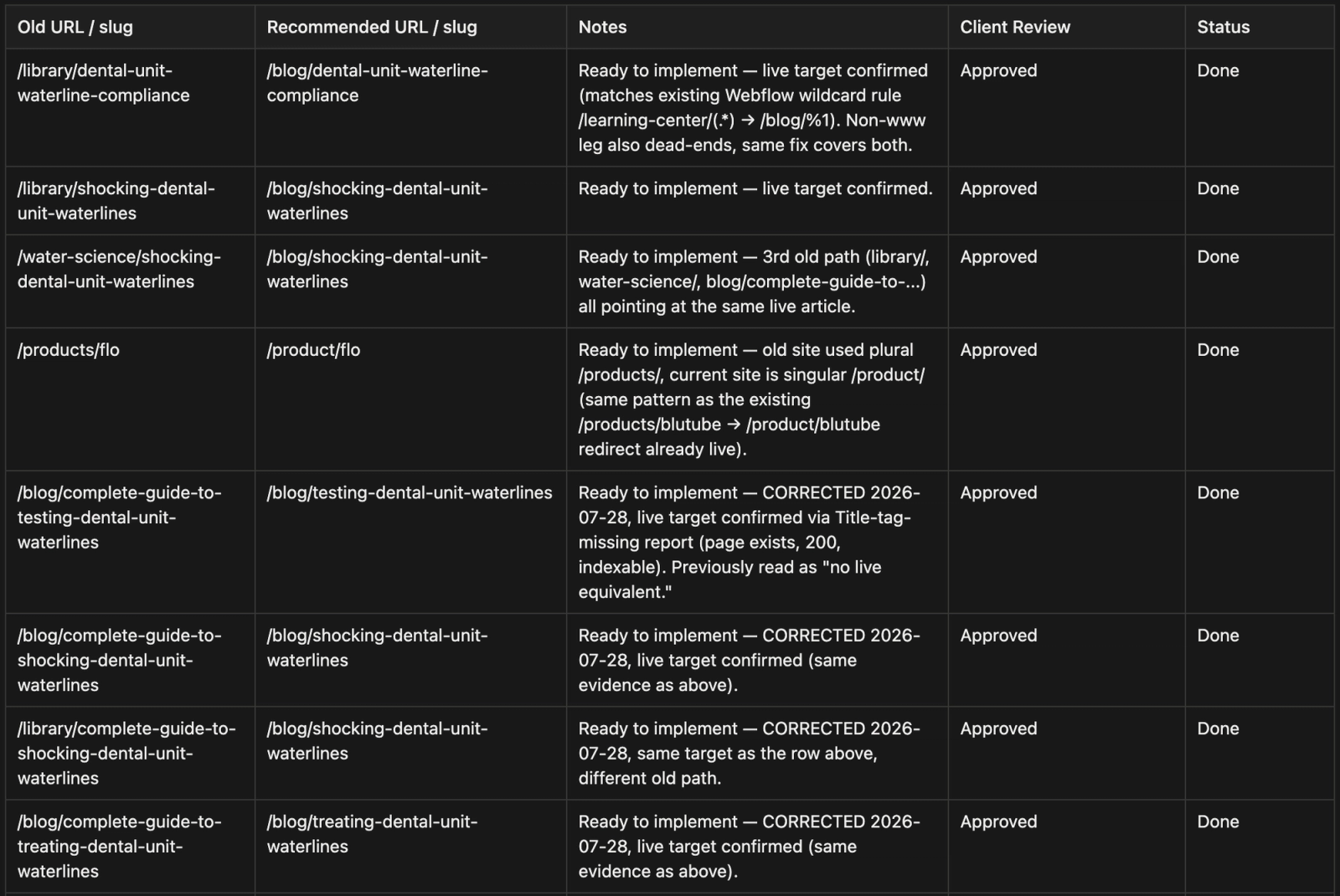
The redirect map is a spreadsheet with one row per old URL: where it goes, the redirect type and who tested it. Every URL that changes gets a 301 to its closest match. Pointing many old URLs at the homepage confuses visitors, and Google may treat it as a soft 404.
- Point each redirect straight at the final URL. Google suggests no more than three hops in a chain. Aim for one.
- Update internal links to the new URLs, so the site doesn't route its own visitors through redirects.
- Carry titles, meta descriptions, canonical tags and schema across with the content.
- Keep the redirects for at least a year, which is Google's general guidance for a site move. For visitors following old links, Google suggests keeping them indefinitely.
Here is part of the redirect map from our ProEdge Dental repair. Every row carries the old path, the new one, the reasoning, the client's sign-off and the status:
On Webflow, redirects live in the site's hosting settings, and our Webflow 301 redirects guide walks through the setup.
Launch day, and what a normal dip looks like
Launch on a weekday morning with the team on hand, and work through these steps in order:
- Remove the
noindextag and any password protection from the new site. - Check that
robots.txtallows crawling. - Test the top 20 URLs from your benchmark. Each old URL should return a single 301 to the right page.
- Submit the new XML sitemap in Search Console.
- For a domain change, submit a Change of Address in Search Console for the old domain.
Then watch. This is how we read the weeks after launch, with what our own domain move looked like at each stage:
Domain moves take the longest. In the Search Engine Journal study of 892 domain migrations, the fastest sites matched their old organic traffic in 19 to 33 days, the average took 523 days, and 17% still hadn't after 1,000 days.
We monitor every client migration for 30 days after launch, because that is when broken redirects surface. On the On-Chain Finance Institute brand split, that monitoring caught a broken redirect in the days after launch.
This is what a steady launch looks like in Search Console: a 300+ page crypto-finance SaaS redesign. Daily clicks stayed between about 30 and 150 for the 100 days after launch. Search Console keeps 16 months of data, so the chart starts 11 days after the site went live.

What our migrations show
The client projects that kept or grew their traffic had every URL accounted for before launch. ProEdge shows the other path: the sitemap was never submitted, redirects were missing or pointed at the wrong pages, and the damage went unnoticed for four months.
Website redesign SEO checklist (short version)
Fifteen checks in launch order. Our website migration checklist expands them into the 50 we run on every client move.
Before design starts
- Crawl and export every indexed URL. Details
- Export Search Console clicks and queries per page.
- List every page with links from other sites.
- Label each URL keep, improve, merge or cut. Details
- Record which URLs AI answers cite.
Before launch
- Build the redirect map, one row per changed URL. Details
- Crawl the staging site with
noindexon. - Confirm titles, meta descriptions, canonicals and schema carried over.
- Test page speed on the main templates. Details
- Update internal links to the new URLs.
After launch
- Remove
noindexand checkrobots.txt. Details - Submit the sitemap, plus a Change of Address for a new domain.
- Test the top 20 redirects.
- Check Search Console daily for 30 days.
- Ask the AI questions again and compare the citations.
When to bring in help
Run it yourself when the change is a reskin or a hosting move on a small site, and the URLs stay where they are. Bring in help when the platform, the domain or the URL structure changes, or when the site has more than a couple of hundred indexed pages, because the redirect map alone becomes a project. Our guide to website migration cost breaks down what that work costs.
If the platform stays and only the design changes, our B2B web design agency team redesigns sites on the stack you already run.
Planning a redesign or a migration?
Send us the URL. We map what has to move, flag what's at risk and give you a plan before design starts.
Website redesign SEO FAQ
Does a website redesign affect SEO?
It does when the redesign changes URLs, content, internal links or page speed. A new look on the same URLs with the same copy carries little risk. Changing the platform, URL structure or domain turns it into a migration, which needs a redirect map and monitoring after launch.
How do I redesign my website without losing SEO?
Benchmark every URL in Search Console before design starts. Give each page a keep, improve, merge or cut decision, 301 every changed URL to its closest match, carry metadata and schema across, and check Search Console daily for 30 days after launch.
How long does it take to recover rankings after a redesign?
Google says a medium-sized site can take a few weeks or more to show the new URLs in place of the old ones, and larger sites take longer. If rankings haven't recovered after two to three months, look for missing redirects or content that was cut.
How much traffic is normal to lose after a website migration?
There is no fixed number. The client moves in our table that had every URL mapped kept or grew their traffic. ProEdge Dental's unfinished move, with missing redirects, lost about 97% of its organic visibility.
Can I change my URLs during a redesign?
Yes, if each old URL gets a 301 redirect to its new address and internal links are updated. Change a URL only where it improves the structure, because every change adds a redirect to maintain.
What is an SEO migration?
An SEO migration is the plan that protects search rankings when a site changes platform, domain, URLs or structure. It covers the URL inventory, the redirect map, carrying metadata and schema across, and monitoring after launch.
Should I redesign and change platform at the same time?
You can. Separate them when you need to know what each change did, because a drop after a combined launch has several possible causes. When you already know what the new site needs, doing both at once gets it live sooner.
Do I need to redirect pages I'm deleting?
Redirect any deleted page that has traffic, links or conversions to its closest relevant page. A page with none of those can return a 404 or 410. Sending deleted pages to the homepage confuses visitors, and Google may treat those redirects as soft 404s.
Will a redesign affect how my site shows in ChatGPT and AI Overviews?
It can. AI answers cite specific URLs, so a cited page that moves without a redirect, or loses the passage that was quoted, can drop out of the answer. Record which pages get cited before launch, keep or redirect them, and ask the same questions again after launch.
How much does a website redesign or migration cost?
At Khod, a 1:1 migration costs $5,000 to $20,000 depending on the platform, and a migration with a redesign runs up to $30,000+. The website migration cost guide breaks it down by platform and includes a calculator.
Share the Article


Kickstart your project today!
Book a call to discuss your goals and how we can help you reach them.
See Khod First on Google
Evgenii Tilipman is the founder of Khod, a digital agency helping B2B tech companies turn their websites into demand-generating assets.
He works closely with founders and GTM teams to define positioning, structure high-converting pages, and build scalable Webflow systems that support growth.
Before founding Khod, Evgenii led Webflow development at an agency and worked with Memberstack to build products for the Webflow community. He has since supported teams from seed to Series C across positioning, conversion, and Webflow development.
Outside of work, he's a husband, dog dad, and someone who treats his health and long hikes with the same consistency he brings to his projects.
Table of Content
Kickstart your project today!
Book a call to discuss your goals and how we can help you reach them.
See Khod First on Google
Explore Related Articles

Website Strategy • Sep 30, 2026 • 7 min read
Website Migration Cost in 2026: $5,000 to $30,000+
Website Strategy • Sep 10, 2026 • 15 min read
8 Best Webflow Agencies for AI Startups in 2026
Tool Comparisons • Jul 29, 2026 • 10 min read
Webflow vs Next.js: Pros, Cons, and How to DecideYour Next Deal Starts With Your Website
Most deals are won or lost before your sales team gets involved. Let's make sure your site is ready for that moment.
