
Resource Center / Articles / Understanding Webflow Pricing: The Only 2026 Guide You Need
Understanding Webflow Pricing: The Only 2026 Guide You Need
 Evgenii Tilipman • Webflow Platform • Published on Dec 6, 2024 • Updated on May 14, 2026 • 12 min read

TL;DR
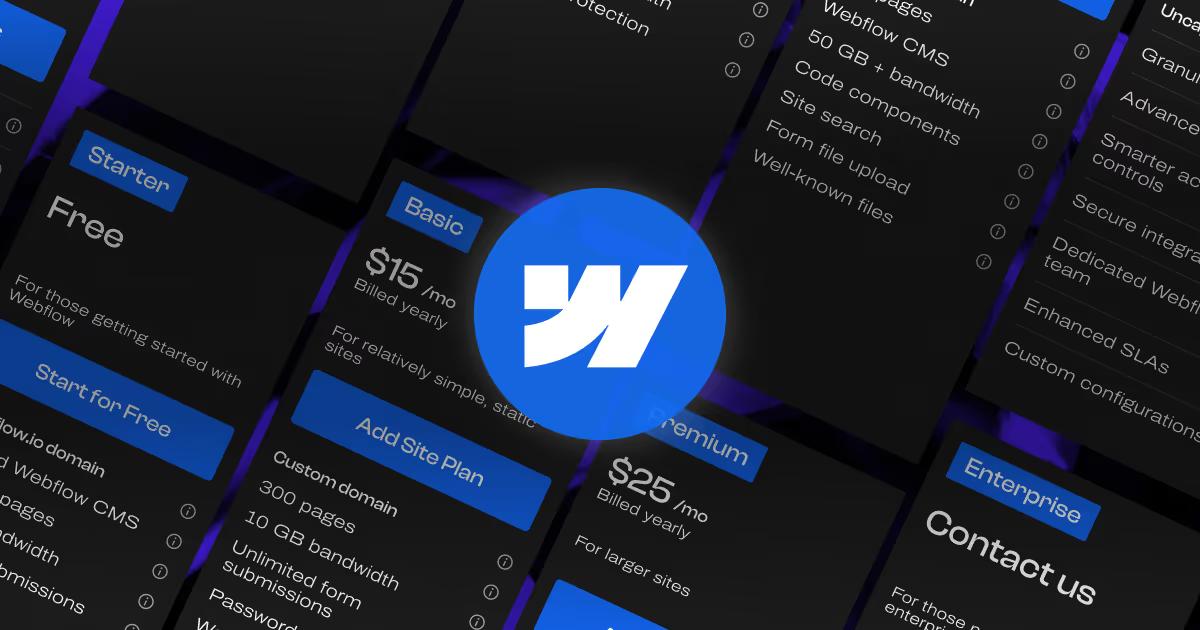
Here are the Webflow Pricing changes from May 2026:
- CMS and Business plans are gone. Both merged into a new Premium plan at $25/mo yearly ($39/mo monthly), roughly $2/mo more than the old CMS plan.
- A new Platform category sits above Site plans, introducing a Team tier at $2,500/mo on top of the existing Enterprise option.
- Site, Ecommerce, and Workspace prices nudged up. Basic is now $15/mo yearly. Ecommerce ranges from $29–$212/mo yearly. Workspace stays at $19–$49/seat/mo yearly.
- Optimize, Analyze, and Localization are now à la carte. Priced by page view ($299/mo Optimize), session ($9/mo Analyze), or locale ($9–$29/mo Localization).
The takeaway: Webflow is doubling down on enterprise positioning. Community reactionshows a chunk of freelancers and small businesses allegedly heading for the door. Whether the new pricing works for you depends on whether you're still in the audience Webflow is selling to.
Why Webflow Pricing Changed (And What It Means for You)
Webflow rebuilt its plan structure to match how teams actually buy. The old CMS/Business split forced marketing sites to pay for capacity they didn't need to unlock features they did. Premium fixes that. The new Team plan creates a clear stepping stone between Site plans and Enterprise that didn't exist before.
Webflow framed the update as a pricing simplification: fewer tiers, clearer plan paths, and more capability bundled into the core plans. That’s true on paper, but for B2B teams, the practical question is less “is pricing simpler?” and more “which plan now matches how our site is actually used?”
See the announcement below:
So if you've been running a Business plan, your renewal will look different. If you've been holding off on Enterprise because the conversation felt like a leap, Team seems to be the in-between solution. And if you're starting a new site today, the free Starter tier is more capable than what Webflow has ever offered for $0, including Webflow AI and an MCP server.
As always, there has been community pushback on some of the changes, especially around the jump from Site plans to the new Team tier and the price increases. We'll cover where that lands later in the article.
The harder read: Webflow is making a deliberate call on their "for Enrterprise" positioning. The free Starter became more generous than ever, but the price to publish a B2B site went up.
Webflow's Pricing Structure in 2026
Webflow now organizes its pricing into five categories:
- Site plans: what you pay per published website
- Platform plans: organization-level governance and support
- Ecommerce plans: for online stores
- Workspace plans: for the team building the sites
- Add-ons: Optimize, Analyze, Localization, AI credits
Site plans and Workspace plans are still the two you'll touch first. Platform plans are where it gets interesting, more on that below.
Site Plans
Site plans are what you pay per website. Each one tier unlocks more bandwidth, more pages, and the features that come with a paid hosting layer.
Starter: Free
- Webflow.io subdomain
- 2 static pages
- 1 GB bandwidth
- 50 form submissions/month
- Limited Webflow CMS
- Webflow AI
- MCP server
- Webflow Cloud app hosting
- Free Starter Workspace
Ideal for: learning Webflow, testing ideas, or building prototypes. Not for real marketing sites because you can’t connect a custom domain.
Webflow AI, MCP, and Cloud app hosting make the free plan feel more capable, but Starter is still a sandbox and not a launch tier.
Basic: $15/mo (yearly); $25/mo (monthly)
- Custom domain
- 300 static pages
- 10 GB bandwidth
- Unlimited form submissions
- Password protection
- Webflow AI, MCP server, Cloud app hosting
- Free Starter Workspace
Ideal for: simple brochure sites, founder bios, and static marketing pages that don’t need CMS content.
Our take: Basic is a trap tier for most B2B teams. If you plan to publish blogs, case studies, resources, team pages, or structured content of any kind, skip it and go straight to Premium. You’ll likely outgrow Basic within the first week of building seriously.
Premium: $25/mo (yearly); $39/mo (monthly) — NEW
Everything in Basic, plus:
- Webflow CMS
- 50 GB bandwidth (selectable to higher tiers)
- Code components
- Site search
- Form file upload
- Well-known files
Ideal for: most B2B marketing sites. If you need a blog, case study library, resource center, team pages, or any CMS-driven content, Premium is the right starting point.
The main improvement is flexibility. Premium bundles CMS, code components, site search, file uploads, and 50 GB of bandwidth, with the option to scale bandwidth without jumping straight to Enterprise.
Our take: Premium is where the price increase shows up. It replaces the old CMS/Business split; the value only makes sense if you use the added features. For a growing B2B site, it’s the default. For a 5-page website, it’s overkill.
Platform Plans
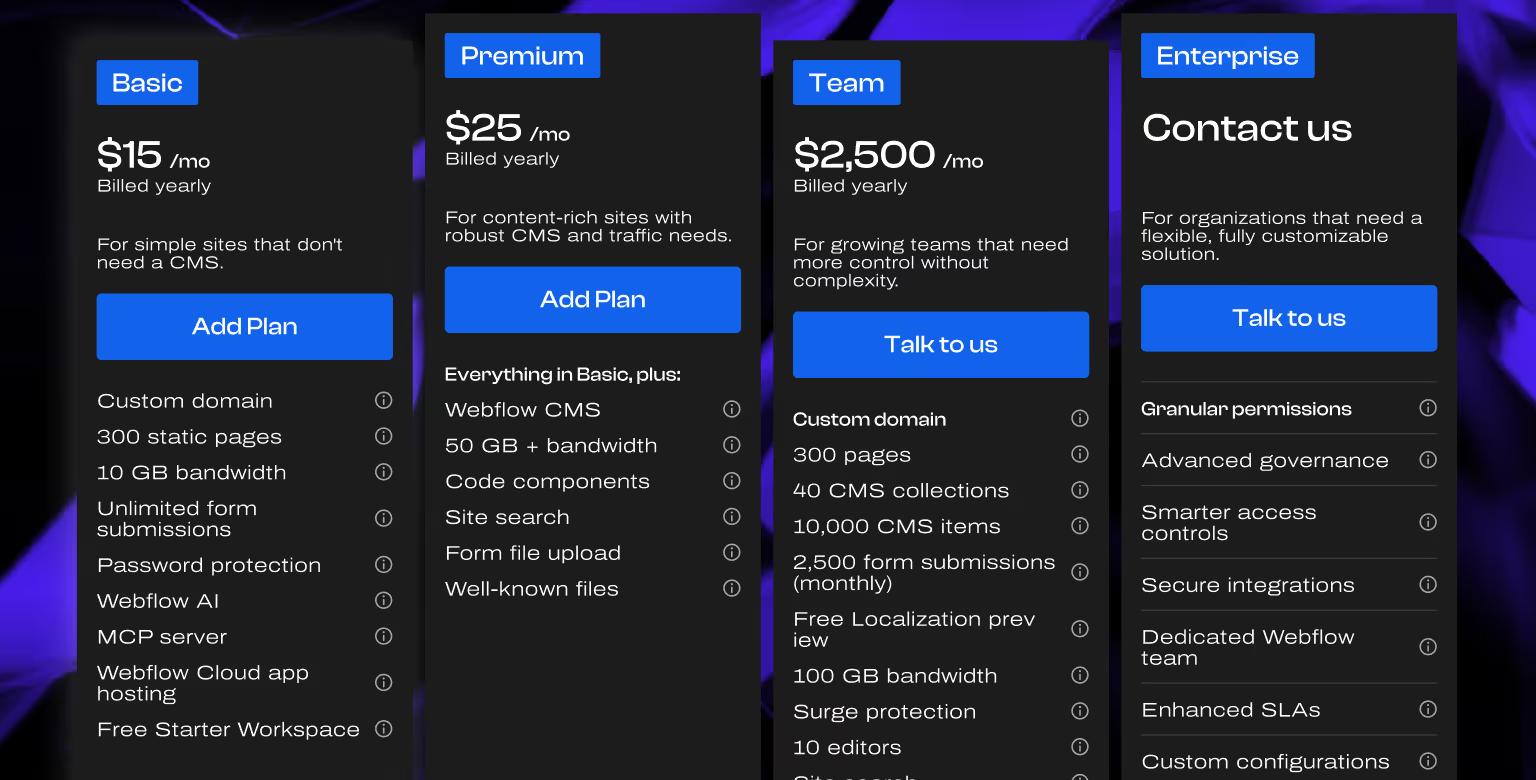
This is the new layer in 2026. Platform plans sit above Site plans and operate at the organization level rather than per site.
Team: $2,500/mo (annual contract required) — NEW
- Site & Workspace bundled
- Advanced publishing
- Foundational governance
- Enhanced security & compliance
- Priority support
- AEO agents (coming soon)
Our take: Team is not for freelancers, agencies, or 5-person marketing teams. It’s for companies that would have previously been pushed into Enterprise quotes and now have a fixed published price. If you’re not asking for SSO, audit logs, approval workflows, or dedicated support, you’re not the buyer.
Enterprise: Custom
Everything in Team, plus:
- Granular permissions
- Advanced governance
- Smarter access controls
- Secure integrations
- Dedicated Webflow team
- Enhanced SLAs
- Custom configurations
Our take on Enterprise: Enterprise is less about unlocking extra product features and more about buying the relationship layer: faster support, stronger SLAs, and an account team that understands your stack. Useful for in-house Webflow teams managing high-risk sites. Less necessary for agencies and most SMBs.
Ecommerce Plans
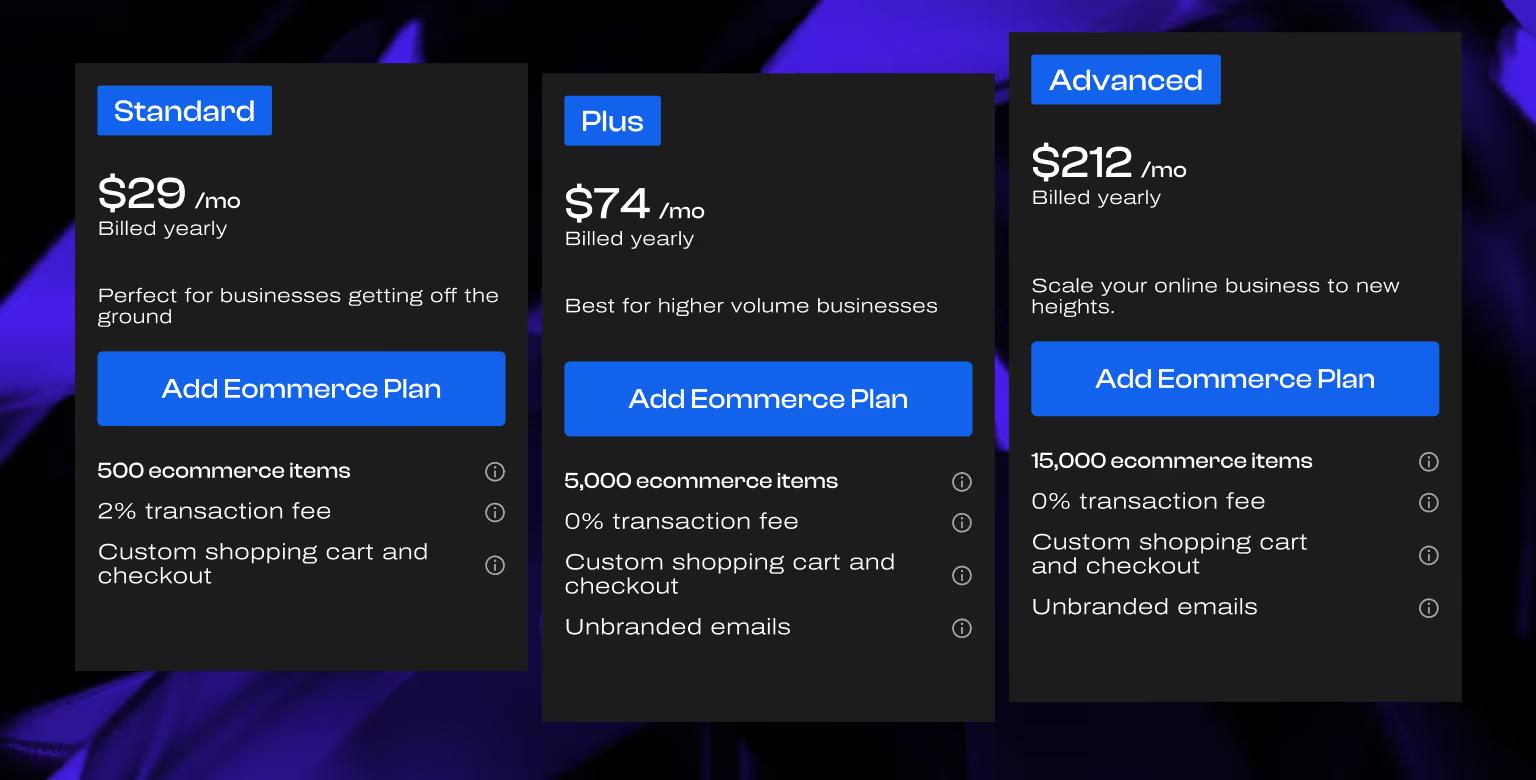
Online stores still get their own track. Pricing here is largely unchanged from the prior structure.
Plus and Advanced both include custom shopping cart, custom checkout, and unbranded emails. The transaction fee is the deciding factor between Standard and Plus, once your store does roughly $3,500 a month in sales, the Plus plan pays for itself versus Standard's 2% fee.
Webflow Ecommerce and Webflow Localization still don't work together. If you're running a multilingual online store, Webflow isn't the answer.
Our take: if you’re choosing an ecommerce platform from scratch in 2026, Webflow probably isn’t it. Shopify owns this category for a reason. Webflow Ecommerce makes sense when you’re already using Webflow for the marketing site and want a simple store with unified branding, but not when ecommerce is the core business.
Workspace Plans
Workspace plans sit on the team side rather than the site side. They cover staging environments, AI credits, code export, and collaboration features.
A pattern we see across clients: most teams pay for Core or Growth before they need to. The Starter is genuinely useful for longer than the pricing page suggests.
Starter: Free
- Unlimited paid hosted sites
- 2 staging sites
- 2 pages per staged site
- 50 CMS items per staged site
- 200 AI credits
- 1 full seat included
- Agency/freelancer guest access
The Starter Workspace is now bundled with every Site plan. You no longer need to pay separately to get started.
Our take: stay on Starter until the staging limits block you. The 2-staging-sites cap only matters if you’re running multiple builds in parallel. A solo founder or small team shipping one site at a time can stay on the free tier for months.
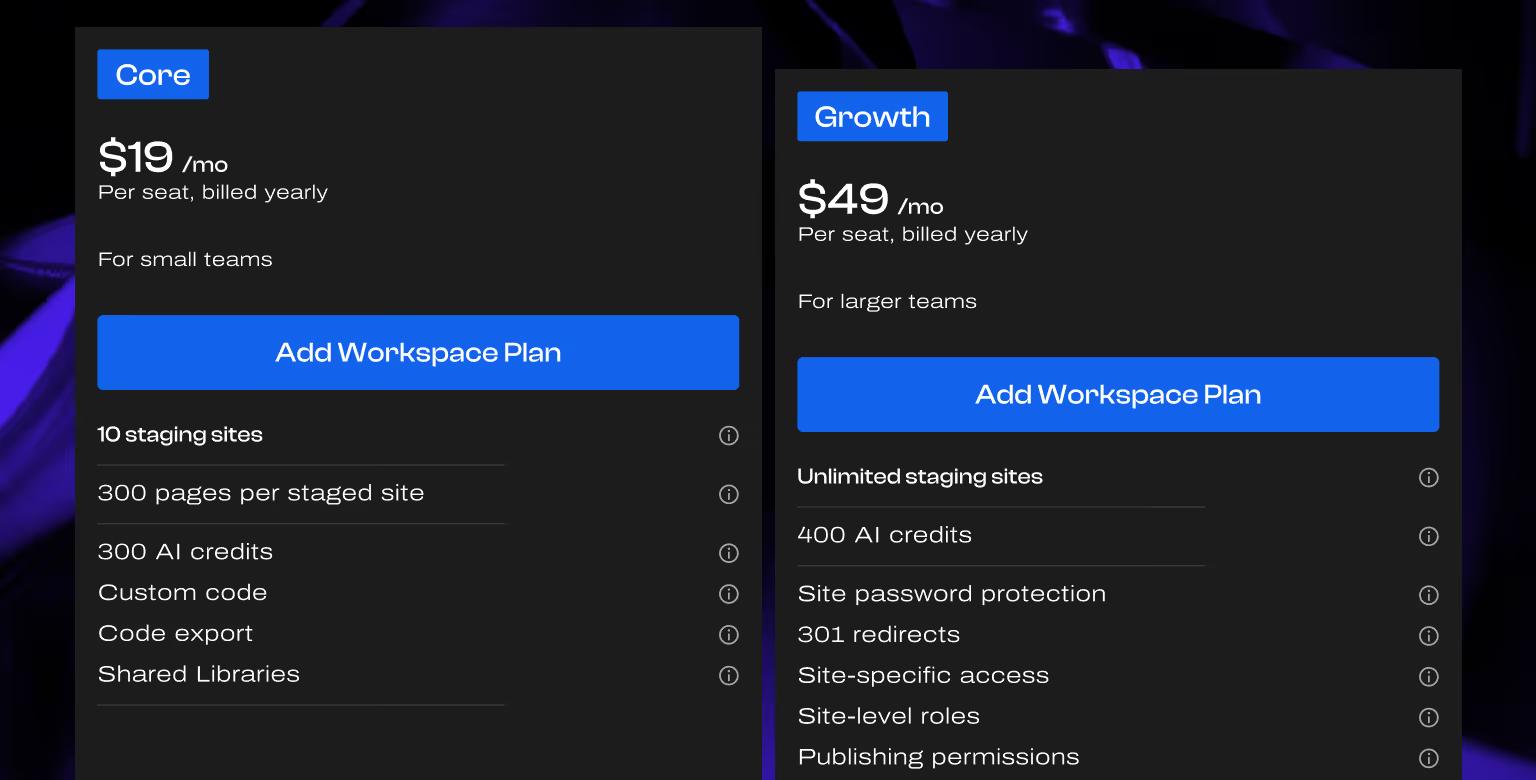
Core: $19/seat/mo (yearly); $28/seat/mo (monthly)
Everything in Starter, plus:
- 10 staging sites
- 300 pages per staged site
- 300 AI credits
- Custom code
- Code export
- Shared Libraries
Ideal for: Small teams managing a handful of projects with real staging needs.
Our take: Core is worth it for code export and Shared Libraries. If you’re not exporting code or maintaining reusable components, Starter is likely to be enough.
Growth: $49/seat/mo (yearly); $60/seat/mo (monthly)
Everything in Core, plus:
- Unlimited staging sites
- 400 AI credits
- Site password protection
- 301 redirects
- Site-specific access
- Site-level roles
- Publishing permissions
Ideal for: agencies, in-house marketing teams, and teams that need role-based control over publishing.
Our take: the unlock is publishing permissions. If someone on your team could accidentally break the live site, Growth pays for itself the first time that risk is avoided.
The freelancer and agency tab uses the same Starter, Core, and Growth structure. The pricing and features are identical; the tab mostly exists for Webflow’s own routing.
Workspace Seats
Webflow's seat model is unchanged from 2025: three seat types, priced per seat. One full seat is included on every Workspace plan.
The seat structure remains the lever that matters most for cost control. A 5-person team where two people actually build the site can run on 2 Full seats + 2 Limited seats + 1 Free seat, not 5 Full seats. That's the difference between a $195/mo line item and a $108/mo one.
Teams overspend most often by defaulting everyone to Full seats. In most B2B marketing teams, the Limited seat does more work than people expect. Editors, content managers, and page builders often don’t need full Designer access.
For a detailed breakdown of how seats work in practice, we still recommend Nelson's explainer video from when the seat system was introduced:
AI Credits: Coming Soon
A new add-on is on the way: 2,000 AI credits/mo for $20/mo (yearly) or $25/mo (monthly). These power Webflow AI feature usage across the Workspace, on top of the credits each plan already includes.
Our take: skip it until your team actually hits the in-plan limit. Most B2B teams we work with are not asking for more AI generation capacity. They’re asking for CMS migration help, clearer renewal pricing, and better answers on legacy Business plans.
AI credits may become useful over time. For now, they feel more like Webflow pushing a new usage habit than solving a clear buying pain.
Add-Ons
Add-ons attach to Site plans and unlock functionality Webflow used to bundle or sell separately.

Optimize: $299/mo (yearly); $379/mo (monthly)
Base tier: 25,000 page views/mo, scales up.
- Up to 5 concurrent optimizations
- A/B testing
- Personalization
- AI Optimize
- Audience insights
- Audience targeting
Ideal for: marketing teams already running structured experimentation.
Our take: Optimize is priced like real CRO software, not a casual A/B testing toggle. If you don’t already have a hypothesis pipeline and someone owning experimentation, the tool isn’t your bottleneck — the process is.
Don’t buy Optimize to start testing. Buy it once you’ve outgrown your current tooling. If $299/mo is too much, third-party tools like Optibase can still work depending on the use case.
Analyze: $9/mo (yearly); $12/mo (monthly)
Base tier: 2,000 sessions/mo, scales up.
- Auto-captured page views, sessions, and visitors
- Auto-captured click data
- Site analytics overview
- Page-level insights
- Shareable insights
- Integrations with consent management solutions
Ideal for: teams that want simple first-party analytics inside Webflow.
Our take: Analyze is the easiest yes in the add-on lineup. Don’t replace GA4 with it, though. Run both in parallel. Analyze gives you quick Webflow-native visibility; GA4 still matters for SEO, attribution, and broader reporting workflows.
Localization: Essential ($9/mo yearly); Advanced ($29/mo yearly)
Both priced per locale, scaled by how many languages you publish.
Essential includes machine-powered translation, CMS localization, static page localization, localized SEO, and style localization.
Advanced adds asset localization, localized URLs, and automatic visitor routing.
Ideal for: sites that need to publish in more than one language.
Our take: Localization has been one of Webflow’s best features. For most B2B sites with global audiences, Advanced is the better pick because automatic routing turns localization from “we have a language picker” into a proper localized experience.
The caveat remains: Localization still does not work with Webflow Ecommerce.
How to Pick the Right Plan
The right plan depends on what your site needs to do, not what your team is.
If you're a solo founder validating an idea: Starter (free) or Basic ($15/mo). You don't need CMS yet.
If you're publishing structured content (blog, case studies, resource center): Premium ($25/mo yearly). This is the most common landing spot for B2B marketing sites.
If you're an agency or in-house team managing multiple sites: Workspace Growth ($49/seat/mo) plus the right mix of seats. Use Limited seats wherever you can.
If you're a mid-market or growth-stage org needing governance and support: Platform Team ($2,500/mo). There is a large jump in price.
If you have compliance, SSO, or audit log requirements: Enterprise. Custom pricing, dedicated relationship.
If you're running an online store: Ecommerce Standard, Plus, or Advanced, sized by volume. The 0% transaction fee on Plus and Advanced is usually the deciding factor over Standard.
For most of our Webflow development clients, the answer is Premium + a Workspace Growth plan + Analyze + Localization where relevant. That covers a B2B marketing site at scale without overpaying for capacity.
One pattern worth flagging: Start one tier lower than you think you need. It's easier to increase the plan than to downgrade it. We've overpaid on multiple occasions and were stuck with annual plan we didn't use.
Additional Costs Worth Planning For
Webflow's pricing is transparent, but a few line items live outside the plan itself.
- Custom domains. Not included. Purchase separately from a registrar.
- Custom integrations. Tools that don't natively connect (often via Make, Zapier, or direct API) carry their own subscriptions.
- Custom code and development work. Webflow gives you a visual canvas. Anything beyond it, complex animations, custom integrations, performance optimization, still benefits from a developer in the room.
- Strategy and design. The plans cover the tool. They don't cover whether the site converts. That part starts with a strategy phase.
Our take: Webflow pricing is usually the smallest variable in whether the site works. A $25/mo Premium site with clear positioning and a strong conversion path can outperform a more expensive setup with no go-to-market strategy. The plan gives you the infrastructure. Strategy determines whether that infrastructure turns into revenue.
How Webflow Pricing Compares to Other Platforms
Webflow still sits between low-cost builders (Wix, Squarespace) and high-flexibility platforms (WordPress). The 2026 restructure didn't move it.
What did move: the entry-level price for a real marketing site went up. Old Basic was $14/mo. New Premium, which is what most B2B sites will actually need, is $25/mo. That's a 79% increase at the tier most marketing teams land on.
For context:
- Vs. Squarespace: Webflow remains more expensive but offers meaningfully more design and CMS control.
- Vs. Wix: Wix wins on out-of-the-box simplicity. Webflow wins on anything that needs to scale or convert.
- Vs. WordPress: WordPress is cheaper at the hosting layer, more expensive once you factor in plugin licenses, developer time, and ongoing maintenance.
The total cost of ownership comparison hasn't shifted dramatically. The list price has.
Our take: the cheapest line item is the wrong place to optimize. WordPress hosting at $5/mo doesn't beat Webflow Premium at $25/mo once you factor in the developer hours we've watched clients burn keeping plugins compatible. The number on the invoice isn't the number you actually pay.
Pricing is also only half the comparison. If a custom-built site is on the table too, our Webflow vs custom code guide walks through the tradeoffs beyond cost.
Final Words
Webflow’s 2026 pricing is cleaner than what came before it. Premium consolidates what most marketing teams need into one plan. Team gives mid-market companies a clearer step before Enterprise. Add-ons let you pay for Optimize, Analyze, and Localization only when you use them.
The trade-off is simple: the entry point for a real B2B marketing site went up. If you’re already on a legacy CMS or Business plan, renewal is where the pricing change will matter most.
If you’re comparing Webflow against other platforms, ask what you’re getting for the price and if it's a smart investment. A site that doesn’t convert is expensive regardless of the platform fee. A site that does convert is usually one of the cheapest line items in your growth budget.
That’s the part we focus on at Khod. We build Webflow sites for funded B2B startups, starting with buyer research, positioning, and a strategy brief that guides every design decision.
The plan may matter somewhat, but what gets built on top of it matters more.
If you’re choosing a Webflow plan and want a second read on what fits your business, book a strategy call.
Frequently Asked Questions
Did Webflow remove the CMS and Business plans?
Yes. The new Premium plan replaces both. It includes Webflow CMS, code components, site search, form file upload, and a flexible bandwidth selector starting at 50 GB.
How much does Webflow cost for a small B2B marketing site in 2026?
For most teams: Premium at $25/mo (billed yearly) plus a Workspace Starter (free) or Core plan ($19/seat/mo). If you're running analytics natively, add Analyze at $9/mo. A realistic baseline is $35-$55/mo plus seats.
What is the new Platform Team plan?
Platform Team is a $2,500/mo organization-level plan introduced in 2026. It bundles Site and Workspace features with advanced publishing, foundational governance, enhanced security, priority support, and upcoming AEO agents. It sits between Site plans and Enterprise.
Is the Webflow free Starter plan good enough to launch a real site?
Not for a customer-facing marketing site. You can't connect a custom domain on Starter, and you're capped at 2 static pages with 1 GB of bandwidth. It's useful for prototyping or learning the Designer.
What's the difference between Webflow Workspace seats?
Full seats ($39/mo yearly) handle design, development, and admin. Limited seats ($15/mo yearly) handle content editing and component-based page building. Free seats are for reviewers and commenters. Most teams overpay on seats by buying Full when Limited would suffice.
Are Webflow Localization and Webflow Ecommerce compatible yet?
Not as of May 2026. Localization still doesn't work with Ecommerce. If you're running a multilingual online store, you'll need a different platform or a workaround.
Has Webflow grandfathered legacy CMS and Business plan customers?
Webflow has historically honored existing plans through pricing transitions, but specifics depend on renewal cycle and account type. If you're on a legacy plan, confirm with Webflow directly before renewal.
Do I need an agency to set up Webflow pricing correctly?
No, the pricing page is self-serve. You'll benefit from an agency when the build itself, strategy, design, CMS architecture, SEO, and CRO, needs to deliver business results, not just exist. That's what Khod does.
Share the Article
Evgenii Tilipman is the founder of Khod, a digital agency helping B2B tech companies turn their websites into demand-generating assets.
He works closely with founders and GTM teams to define positioning, structure high-converting pages, and build scalable Webflow systems that support growth.
Before founding Khod, Evgenii led Webflow development at an agency and worked with Memberstack to build products for the Webflow community. He has since supported teams from seed to Series C across positioning, conversion, and Webflow development.
Outside of work, he's a husband, dog dad, and someone who treats his health and long hikes with the same consistency he brings to his projects.
Table of Content


Kickstart your project today!
Book a call to discuss your goals and how we can help you reach them.
See Khod First on Google
Explore Related Articles
Website Strategy • Sep 10, 2026 • 15 min read
8 Best Webflow Agencies for AI Startups in 2026
Tool Comparisons • Jul 29, 2026 • 10 min read
Webflow vs Next.js: Pros, Cons, and How to Decide
Tool Comparisons • Jul 14, 2026 • 13 min read
Webflow vs Custom Code: Pros, Cons, and How to DecideYour Next Deal Starts With Your Website
Most deals are won or lost before your sales team gets involved. Let's make sure your site is ready for that moment.
