
Resource Center / Articles / Astro vs Next.js: Which One Fits Your Website in 2026
Astro vs Next.js: Which One Fits Your Website in 2026
 Uros Stancic • Tool Comparisons • Published on Oct 14, 2026 • Updated on Oct 15, 2026 • 13 min read

TL;DR
The median mobile page loads 558 KB of JavaScript, and 44% of it never runs, according to HTTP Archive's 2024 Web Almanac. That gap sits at the center of Astro vs Next.js, because the two frameworks start from opposite defaults.
- Content site with no logins: pick Astro. Pages ship as HTML and only the interactive parts load JavaScript. When we rebuilt our own homepage in Astro with the same content, its median mobile PageSpeed score went from 68 to 93.
- Product, portal or per-user content: pick Next.js. You get a server runtime, API routes and React across the whole app. Our own Next.js homepage still loads about 450 KB of its own JavaScript, compressed, after we cut Sanity's editing tools from it.
- SEO is a tie. Both send crawlers full HTML and give you code-level control of schema, sitemaps and canonicals.
- 2026 changed the picture. Cloudflare took over the company behind Astro, Astro 6 added live CMS content without rebuilds, and Next.js moved to scheduled security releases after a CVSS 10 flaw in React Server Components.
The short answer
Ask one question: does your website deliver content, or does it run logic for each visitor?
If it delivers content (home page, service pages, case studies, a blog, landing pages, careers), Astro is the better default. It renders pages to HTML at build time, so a page with no interactive parts sends zero JavaScript to the browser.
If it runs logic (a login area, a dashboard, prices that change per customer, a configurator that saves state across pages), Next.js is the better default. It's a React framework with a server behind it, so every page can fetch data per request, check a session or call your own API.
Most marketing sites we build sit in the first group with a few interactive moments: a pricing toggle, a form, a carousel. Astro handles those as islands, small components that load their own JavaScript while the rest of the page stays static.
What each framework is
Astro turns components, Markdown and CMS data into HTML at build time. Interactive parts are islands: a React, Vue, Svelte or Solid component that loads its JavaScript right away, when it scrolls into view, or when the browser is idle. The current major version is Astro 6.
Next.js is Vercel's React framework. It renders pages on the server, at build time or both, and adds React Server Components, API routes, middleware and incremental static regeneration (ISR), which refreshes a page after you publish. khod.io runs on version 16.
Astro vs Next.js: side by side
What we measured: our homepage on both frameworks
khod.io has run on Next.js 16 since we moved it off Webflow in 2026. We rebuilt its homepage in Astro 5 as a test copy, so we could compare the two frameworks on the same page. The copy reuses the homepage's React components, Sanity content, CSS, fonts, Google Analytics and PostHog, and it runs on Vercel like the original. Sections render to HTML at build time. Only the interactive parts load JavaScript, as islands: the menu, the hero form and video, the logo rotator and the carousels.
We tested three versions: the Next.js homepage as it ran on 14 October, the same page after we stopped loading Sanity's editing tools for visitors, and the Astro copy. On 15 October, between 16:20 and 16:45 CEST, we ran PageSpeed Insights on mobile 18 times per version, rotating between the three so each saw the same network conditions. PageSpeed runs Lighthouse 13.5 on an emulated Moto G Power over throttled 4G. Two runs of the 14 October version ended before its scripts had loaded, so its medians use the other 16.
With the same markup and content, the Astro copy scored 93 against 68 for the fixed Next.js page, and every Astro run scored above that median. Largest Contentful Paint halved, from 6.3 to 3.2 seconds. Our best explanation: on PageSpeed's throttled connection, the hero image shares bandwidth with every script the page requests, and the Astro copy requests about 160 KB less. Its HTML is lighter too, because Next.js embeds the data its client-side router needs in every page, and Astro has no client router to feed by default.
Astro's runs fall into two groups, 69 to 80 and 93 to 97. The split follows First Contentful Paint, which alternates between about 1.4 and 2.5 seconds from run to run on all three pages, so its medians say little. Astro still loads 24 script files, because each island and each shared library arrives as its own small file.
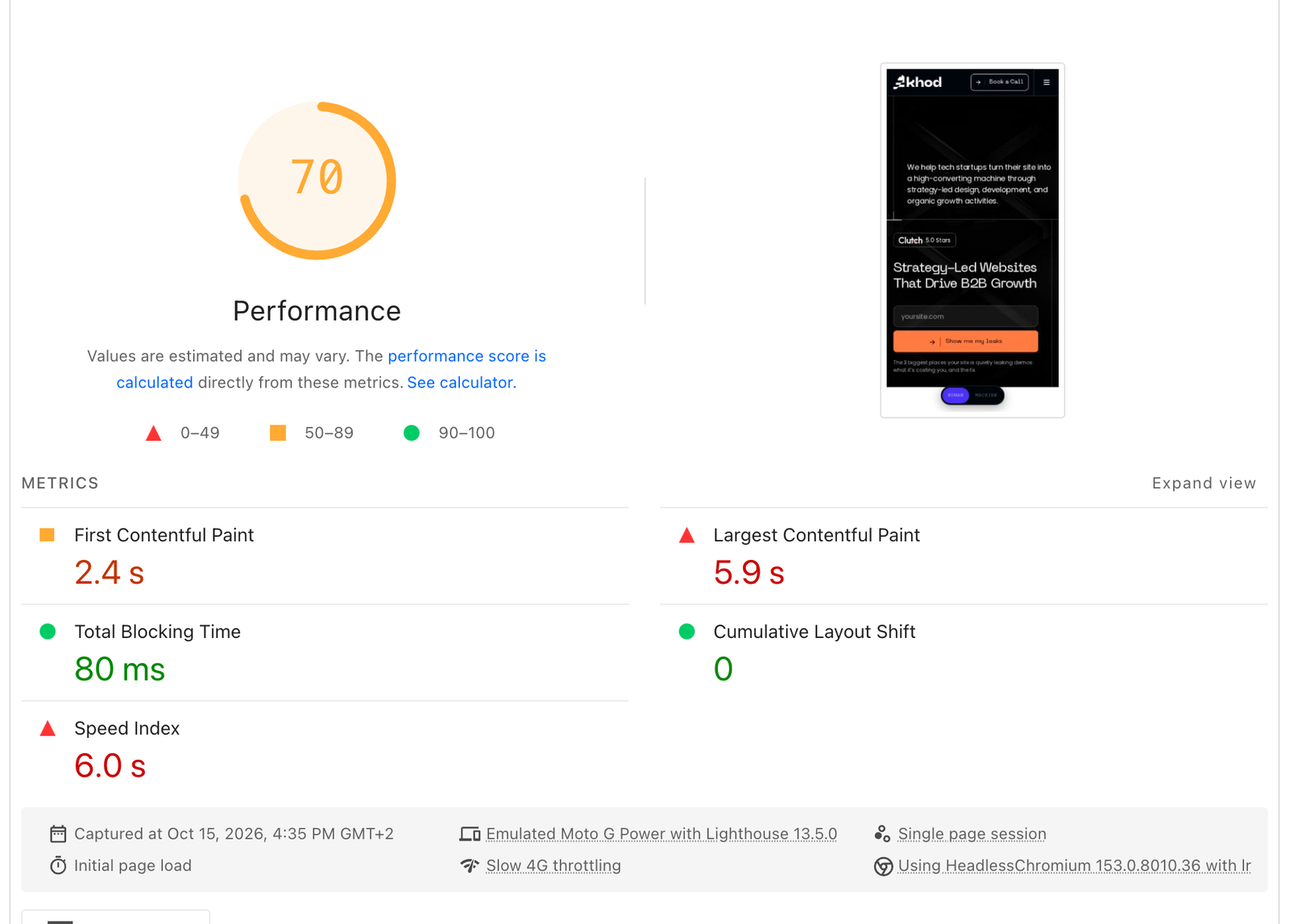
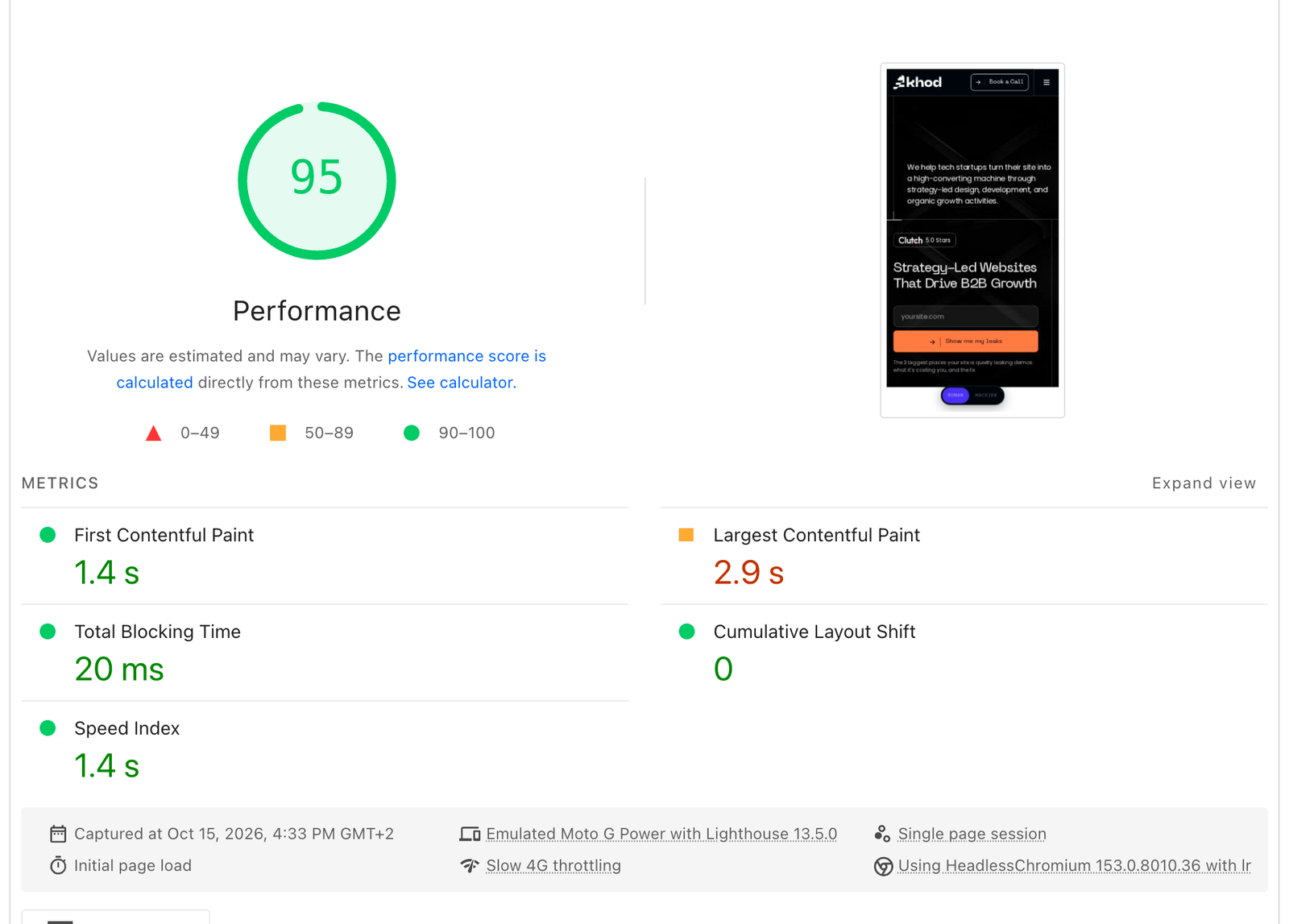
See PageSpeed's full report for the Next.js run. The Astro run has its own report.
Where our Next.js JavaScript came from
Before the fix, our Next.js homepage downloaded 935 KB of JavaScript, compressed, and the largest part was our own doing. About 309 KB was Sanity's live-preview and visual-editing tooling, which our root layout loaded for every visitor even though only editors use it. Next.js didn't force that. It let it pile up without anyone deciding it should. The rest was analytics at 252 KB (Google Analytics 176 KB, PostHog 76 KB), React and the Next.js runtime at 164 KB, our own components at 142 KB, and scroll, slider and interaction scripts at 68 KB. On the Astro copy, React for the islands comes to 59 KB and the components to 45 KB. PostHog is the one part that grew, to 115 KB.
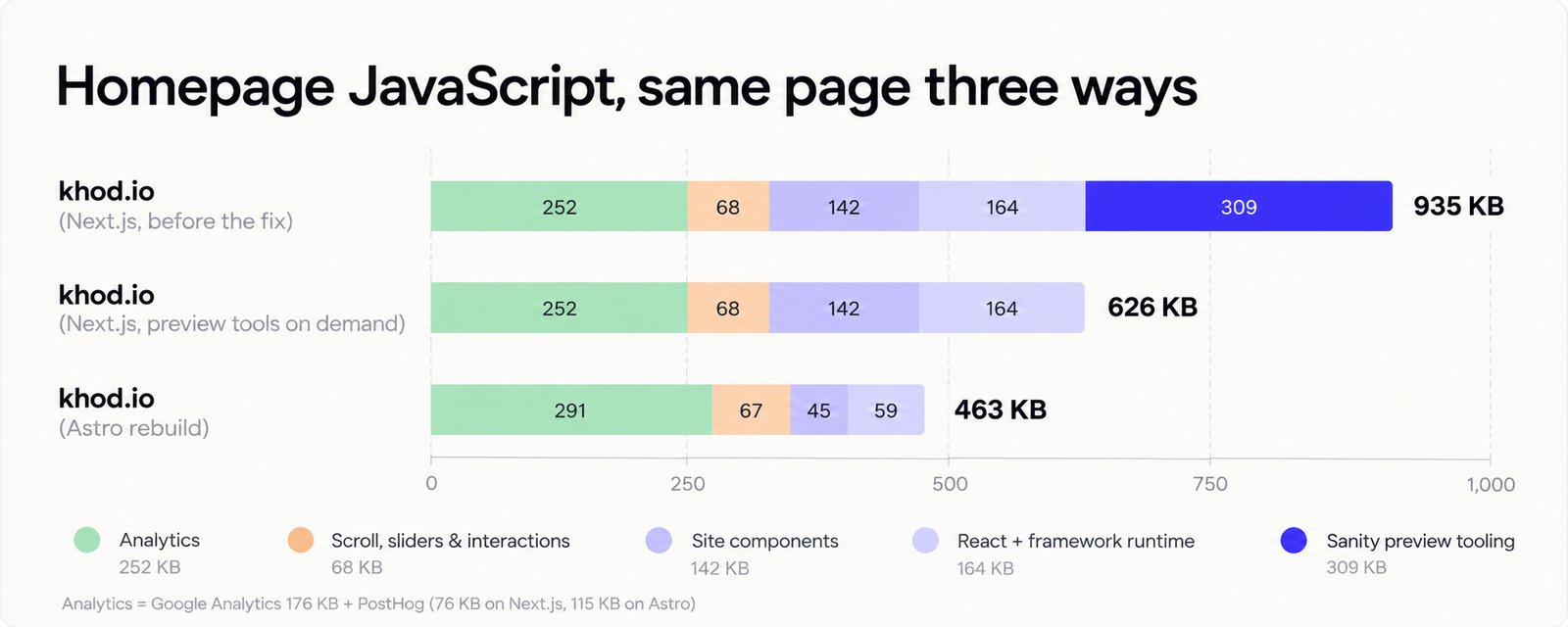
The culprit was a small Disable Draft Mode link for editors. Its import pulled in Sanity's whole editing interface, so the interface shipped to every visitor. Loading it only when the preview cookie is set cut our JavaScript by a third and Total Blocking Time by about 90 ms. The score barely moved, from 64 to 68. Cleaning up a Next.js site helps the main thread, but in this test the framework's default did more than the cleanup.
A client site on Astro: The Accountant Quits
The Accountant Quits, a site we built for a client, runs on Astro 5 on Vercel with Sanity as the CMS. It shows what Astro does on a page that needs almost no JavaScript. On 14 October 2026 we ran PageSpeed Insights six times on its homepage on mobile and took the median.
The page loads one 5 KB script and has zero blocking time, yet it scores 69, well below our Astro rebuild's 93. Its first paint waits on fonts and images, which no framework fixes for you. Less JavaScript helps the main thread; a slow hero image stays slow.
Performance and Core Web Vitals
Astro wins on JavaScript by default. A content page with no islands sends no script, so there is nothing to parse or hydrate, and Interaction to Next Paint stays low on cheap phones.
Next.js can get close with discipline. Server Components keep a component's code on the server, and a page built mostly from them ships far less than a classic React app. The discipline has to hold every sprint, though: one "use client" at the top of a shared layout, one animation library imported into the root, one preview tool mounted for everyone, and every page pays for it. Even after we removed our preview tool, our Next.js homepage loaded about 160 KB more script than the same page on Astro.
Largest Contentful Paint depends mostly on image size and format, font loading, hosting and caching. On slow connections JavaScript plays a part too, because scripts compete with the hero image for bandwidth. Both frameworks ship an image component that handles responsive sizes and modern formats; use it, and preload the hero image either way.
SEO and AI search
This is a tie. Google ranks pages on content, links and experience. Both frameworks send crawlers full HTML, both give you code-level control of titles, canonicals, hreflang, structured data and the sitemap, and both can serve an llms.txt file as a plain route.
Where the framework does touch SEO:
- Rendering: keep important content in server-rendered HTML. In Next.js that means avoiding content that only appears after client-side fetching, which Google has to render in a second pass. In Astro it's the default.
- Speed: less JavaScript improves interaction metrics on slow devices, which feeds Core Web Vitals. It's one signal among many.
- AI answers: assistants that cite pages read the HTML they fetch, so the same rule applies.
- Migrations: switching frameworks changes nothing for Google if URLs, content and redirects stay the same. The ranking risk in a rebuild lives in the URL map. Our website redesign SEO guide covers how to keep it.
Editing content: what your marketing team sees
Your editors work in the CMS. With Sanity, Contentful, Storyblok or Payload, the editing screen is the same whichever framework renders the site. If you're still picking one, our Next.js CMS guide compares eight of them.
The differences sit in how fast a published change goes live and how preview works:
- Astro, static: publishing triggers a rebuild through a webhook. On The Accountant Quits, a Sanity publish fires a Vercel deploy hook that rebuilds all 116 pages in about two minutes.
- Astro 6, Live Content Collections: pages fetch from the CMS at request time, so changes appear without a rebuild. Those pages need server rendering.
- Next.js: on-demand revalidation refreshes the pages a change touches, usually within seconds.
Click-to-edit visual editing works on both. Sanity's Astro integration supports its Presentation tool on server-rendered routes, with Astro's React integration installed, and reloads the preview after each edit. The Next.js integration updates the preview in place as you type. We run Presentation preview on both: The Accountant Quits on Astro, khod.io on Next.js.

Hosting, cost and who owns the framework
Running either costs little next to a website builder subscription. On Cloudflare, requests to static assets are free and unlimited, which covers a fully static Astro site. On Vercel, the Hobby plan is free but limited to personal, non-commercial use, so a business site needs Pro: $20 per developer seat per month, with $20 of usage included.
Ownership matters more in 2026 than it did a year ago. Vercel builds Next.js, and ISR, image optimization and preview deployments work most smoothly there. In January 2026 Astro's core team joined Cloudflare, which already ran Astro under Webflow Cloud and Wix's platform. Both frameworks are MIT-licensed. In practice, a static Astro site can move hosts in an afternoon, and a Next.js site that leans on Vercel-specific features takes more work to move.
Security and maintenance
In December 2025 the React team disclosed CVE-2025-55182, a remote code execution flaw in React Server Components rated CVSS 10.0. App Router sites on Next.js 15 and 16 were exposed in their default setup with no configuration workaround, and follow-up issues needed more patches. The safe move is the latest patch release of your line.
That's the price of a server runtime, and every server framework carries some version of it. A Next.js site needs someone watching advisories and upgrading; Next.js now ships security fixes on a fixed schedule, which makes that easier to plan. A fully static Astro site has no server code running in production, so that class of risk doesn't apply. If nobody on your side will own upgrades, count that in Astro's favor.
Building with AI coding agents
We build a growing number of sites with AI coding agents, and agentic processes now run through every project we take on, Webflow and Framer builds included. On custom-code builds, the step that takes the most rounds is turning a Figma design into code. The code Claude writes is clean and easy to read. The mistakes come from the size of the input: a full Figma page with every layer fills the model's context, the elements it read first get lost by the time it writes them, and the code for those parts drifts from the design.
So a page takes several rounds to match its design. Even with those rounds, it's much faster than building the same page in a website builder or writing it by hand. The limit sits in the design handoff, so it applies whichever framework you choose.
Where Astro stops
Astro handles interactivity inside a page well: forms with validation, filters, calculators, animations, even 3D. It gets awkward when state has to live across pages and users. Think of a cart that follows a visitor through checkout, a logged-in area with roles, or an interface where users create data and see it update. You can build those in Astro with server rendering and your own session handling, but at that point you're assembling what Next.js already provides.
The second limit is personalization per request. If each visitor sees different content based on account, region or contract, static pages lose their edge, and Next.js has the more complete toolkit for it.
Can you use both?
Yes. The marketing site runs on Astro at example.com, the product runs on Next.js at app.example.com or under /app, and both read from the same CMS. Prices, product names and legal copy get maintained once. For visitors it's one click, and for Google it's an ordinary link between two sites.
Switching between them, or off a website builder
Moving from Next.js to Astro, or the other way, is a rebuild of the front end. If your content lives in a headless CMS, the content model carries over and React components can move into Astro islands. The work to plan is routing, redirects for any URL that changes, data fetching, and retesting each page type.
If you're leaving Webflow, WordPress or Framer, the framework is the smaller decision. The content model, URL map and redirects decide whether rankings survive. We rebuilt khod.io on Next.js and Sanity. Astro would have worked as well; Claude recommended the Next.js and Sanity pairing, we'd seen Memberstack make the same move, and we needed to start somewhere. Our Webflow vs Next.js comparison covers that decision in full.
Our verdict
Pick Astro when the site is there to be read: marketing pages, a blog, docs, landing pages, a content hub, with no logins and no per-visitor data. You get speed by default and the least maintenance.
Pick Next.js when the site is part of a product or will become one: accounts, dashboards, per-request data, your own APIs, or a React team that will own the code for years.
If you're unsure, list your pages and mark each one "content" or "app." If fewer than one in ten are app pages, start with Astro and put the app pages on Next.js later if they grow.
We build on both, including moving existing sites. For a content site on Webflow, see our Webflow to Astro migration. For a product or portal, see Webflow to Next.js. For a new build, see our Next.js development work. Send us your page list and we'll tell you which stack is shorter to build and cheaper to run.
FAQ
Is Astro better than Next.js?
For content sites, yes: Astro ships less JavaScript by default and needs less upkeep. For apps with logins, dashboards or per-user data, Next.js is better because the server runtime and React tooling come built in.
Is Astro faster than Next.js?
Astro sends less JavaScript, so pages become interactive sooner and Total Blocking Time is often zero. Overall load speed also depends on images, fonts and hosting. When we rebuilt our homepage in Astro with the same content, its median mobile PageSpeed score rose from 68 to 93 and Largest Contentful Paint fell from 6.3 to 3.2 seconds.
What is Astro used for?
Marketing websites, blogs, documentation, landing pages and content hubs. Cloudflare says brands including Unilever, Visa and NBC News use it, and that it powers sites built on Webflow Cloud and Wix.
Is Astro or Next.js better for SEO?
Neither has a built-in ranking edge. Both render HTML that crawlers can read and give full control of metadata, schema and sitemaps. Astro's lighter pages can help Core Web Vitals, which is one ranking signal among many.
Can Astro use React components?
Yes. Astro renders React components to HTML and only loads their JavaScript when you add a client directive such as client:visible. You can mix React, Vue and Svelte on one page.
Is Next.js overkill for a marketing site?
Often. A marketing site with no logins rarely needs a server runtime, and you'll spend effort keeping JavaScript down and the framework patched. It makes sense when the site shares code with a React product, or when your team already works in Next.js.
Does Astro need a server?
No. By default Astro outputs static files that run on any CDN. Pages that need request-time data can use server rendering through an adapter for Cloudflare, Vercel, Netlify or Node.
Can I move from Next.js to Astro later?
Yes. If your content sits in a headless CMS, you rebuild only the front end and keep the content model. Keep URLs the same, or map every changed one to a 301 redirect.
Share the Article


Kickstart your project today!
Book a call to discuss your goals and how we can help you reach them.
See Khod First on Google
Uros is the brains behind the builds, turning Figma files into clean, scalable sites. He builds Webflow sites so smooth, you’ll think they coded themselves.
Outside the Webflow canvas, you’ll find him testing out new recipes, planning his next weekend escape, or deep in thought wondering why websites break at 3AM and not during office hours.
Table of Content
Kickstart your project today!
Book a call to discuss your goals and how we can help you reach them.
See Khod First on Google
Explore Related Articles

Tool Comparisons • Oct 7, 2026 • 18 min read
Next.js CMS: Choosing a Headless CMS for Your Next.js Marketing Site
Website Strategy • Oct 4, 2026 • 13 min read
Website Redesign SEO: How to Redesign or Migrate Without Losing Rankings
Website Strategy • Sep 30, 2026 • 7 min read
Website Migration Cost in 2026: $5,000 to $30,000+Your Next Deal Starts With Your Website
Most deals are won or lost before your sales team gets involved. Let's make sure your site is ready for that moment.
