
Resource Center / Articles / Webflow vs Custom Code: Pros, Cons, and How to Decide
Webflow vs Custom Code: Pros, Cons, and How to Decide
 Evgenii Tilipman • Tool Comparisons • Published on Jul 14, 2026 • Updated on Jul 14, 2026 • 13 min read

TL;DR
The choice between Webflow vs custom code depends on two things:
- What you’re building, and
- Who will manage it once it’s live
Both have pros and cons.
- Webflow wins on managed infrastructure. Hosting, security, and uptime are handled for you, and designers can publish pages without touching code.
- Custom code wins on flexibility. Using AI-assisted development, you can now build faster than in a visual builder while avoiding the limitations those builders impose.
- Cost matters, but operability matters more. A custom stack is only a good move if someone on your team, can actually run it. If not, Webflow is the safer call with a large pool of available experts.
- We've done both. We build client sites on Webflow every week, and we moved our own 180-page site off it in about a week.
Webflow vs custom code at a glance
What Webflow is built for
Webflow is a managed visual website platform. Teams build pages through its Designer and CMS, while Webflow handles hosting, SSL, CDN delivery, platform updates, and much of the underlying security infrastructure.
Its main advantage is operability. Designers / developers and trained marketing teams can create, edit, and publish content without managing a codebase or maintaining the hosting environment themselves. That is why it remains a fit for larger businesses. We are Webflow Certified Partners and still build the majority of our client sites on it.
The tradeoff is that the website must operate within Webflow’s native capabilities: its CMS structure, component system, interactions, publishing workflow, integrations, and APIs. The platform can be extended with custom code and external tools, but requirements outside those boundaries often introduce workarounds or additional services.
AI-assisted development does not remove that constraint. An AI agent can help operate Webflow through its MCP, but it cannot freely change parts of the platform that Webflow does not make accessible.
Webflow pros and cons
Pros:
- Managed hosting, SSL, and security. You're not on the hook for patching a server.
- A designer / developer can build and ship pages visually, with no development environment to set up.
- Fast to get a first version live, especially for marketing sites and landing pages.
- A mature ecosystem of templates, plugins, and freelancers who know the platform.
Cons:
- You're building inside the platform's feature set. Anything outside it is a workaround, a third-party embed, or not possible.
- CMS structure is more rigid than a code-first schema, so complex content relationships (a resource hub with cross-linked categories, for example) get harder to model as the site grows.
- Agentic workflows are bottlenecked by Webflow's MCP.
- Cost scales with usage tier, and heavier sites move up Webflow's plan brackets.
Custom code pros and cons
Pros:
- No platform ceiling. If you can describe it, it can be built. This is the real edge, and it used to come with a cost: you needed a developer for every change, and iteration was slow. Agentic development changes that. An agent can restructure a component, update content across a hundreds of pages at a time, or fix a schema issue in one pass, on instruction, which is what closed the speed gap that used to make custom code the slower option.
- Full control over rendering and SEO. You decide what's static, what revalidates, and exactly what structured data each page emits, rather than working within what a builder's SEO settings expose.
- The codebase is yours. No platform lock-in, no migration if a vendor changes its pricing or roadmap.
Cons:
- You own the hosting, security, and uptime, or you pay someone to.
- Design still needs a human with taste driving it. Agentic development handles the mechanical build; it does not yet handle design judgment. Teaching an agent taste is still an unsolved problem.
- If nobody on the team can operate a codebase and an agentic workflow, this becomes a liability instead of an advantage. More on that below, because it's the part people skip.
Should You Migrate to One of These?
If your current site is actually working, don't touch it — a platform switch won't fix a problem you don't have. Run our free Demo Leak Teardown first. It checks six spots — speed, CTAs, mobile, technical SEO, trust signals — so you know if you're fixing something real, or about to redo a site that was fine.
Cost, SEO, and scalability: the three things that actually decide this
Once you get past the surface-level “do I prefer going with a builder, or custom?” question, these are the three factors that matter most.
Cost
With Webflow, the tooling cost is lower, but the operating cost is higher.
The platform bundles the visual builder, CMS, hosting, security, and publishing workflow into one recurring fee of $39/month. Getting started is straightforward. But every meaningful change still depends on someone who knows Webflow, understands the existing build, and can work within the platform’s constraints.
A custom stack flips that equation.
The tooling cost is higher because you are assembling the development environment, AI tools, hosting, CMS, and supporting services yourself. For our migration, the main new expense was a $100-per-month Claude Max subscription. Next.js itself is open source, while we initially used the free tiers of Sanity and Vercel.
But with an agentic workflow, the operating cost can be lower. Our developers did not spend the migration manually writing code. We exported the Webflow code, imported it in claude, explained the undesirable and desired outcomes, identified bugs, and reviewed and refined the result.
When the goal is to get a job done, to move from Point A to Point B quickly, the tradeoff looks like this:
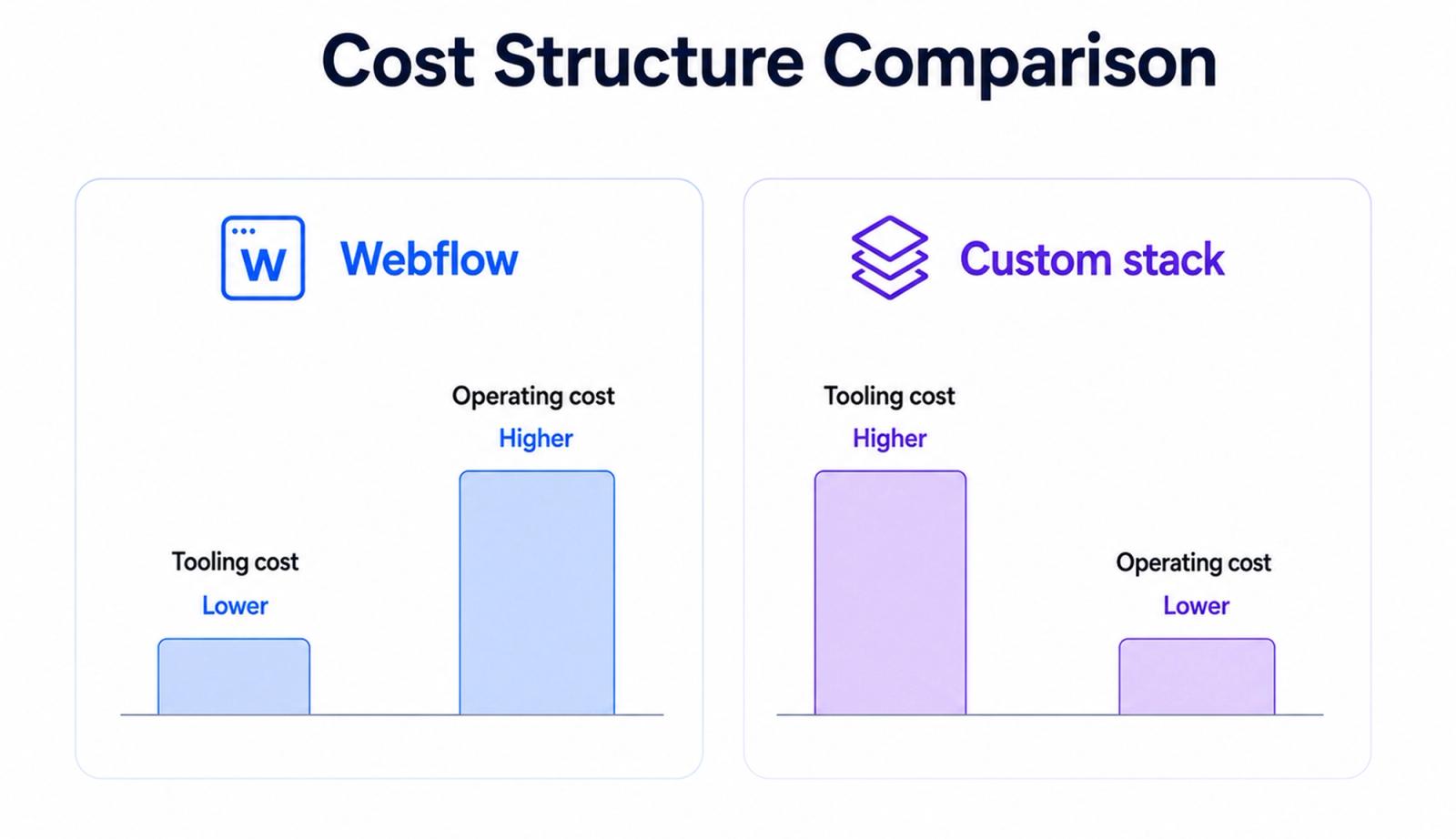
Webflow: lower tooling cost, higher operating cost
That difference compounds over time.
Every new page, experiment, feature, bug fix, and structural change repeats the same cost pattern. The more actively the website evolves, the less important the initial tooling cost becomes, and the more important the operating model becomes.
That does not make custom code automatically cheaper. Someone still needs to direct the agent, evaluate the output, catch problems, and maintain the system. If nobody can do that, the codebase becomes a support ticket waiting to happen.
SEO
Webflow covers the fundamentals. Custom code gives you control over the entire implementation.
Webflow provides the technical SEO controls most websites need:
- Metadata and canonical settings
- Redirects
- Sitemap controls
- Robots.txt
- Standard schema implementation
- Generally solid performance out of the box
Custom code gives you the same levers without a platform-defined ceiling. You decide:
- What is generated statically
- What gets revalidated and when
- Which structured data each page type produces
- How content types, categories, and internal links relate to one another
The gap is that more complex SEO systems can eventually outgrow the structure and controls available inside the platform.
That usually becomes visible on content-heavy websites: resource hubs, integration libraries, location architectures, or anything built around tightly connected topic clusters.
Scalability
The biggest difference is how much complexity the platform lets you manage cleanly.
Webflow can handle high-traffic websites, large CMS libraries, reusable components, references between collections, and multilingual sites. For most marketing websites, that is more than enough.
The limitation appears when the structure becomes more complex than Webflow’s native CMS and component model handle comfortably.
For example:
- Content can reference multiple categories and related resources, but those relationships become harder to manage as the model grows.
- Components can be reused across page types, but they cannot be nested directly inside CMS rich-text content without hacky workarounds.
- Large directories are possible, but advanced filtering, conditional relationships, and dynamic assembly may require external tools or custom code.
- Localization is supported, but maintaining many languages, page variants, and exceptions adds operational complexity.
- Content can be assembled dynamically in several places, but only within the relationships and rendering logic Webflow exposes.
So the issue is how many references, duplicated fields, external tools, and workarounds are required to make them work at scale.
A schema-first CMS such as Sanity gives you more control over those relationships. You can define content types, nested objects, reusable blocks, validation rules, and references around the structure the website actually needs.
Neither approach is inherently unscalable. Webflow simply reaches the point of structural friction sooner.
Some businesses never reach it. The ones that do usually know because the CMS has become harder to explain, harder to edit, and increasingly dependent on workarounds.
When Webflow is the right call
Webflow is usually the right call when you:
- Do not have, and do not want, a technical operator on staff or retainer
- Need a straightforward marketing site, landing pages, and a blog
- Want hosting, security, and platform maintenance handled for you
- Need the site live quickly
- Want a founder or marketer to make routine updates without involving a developer
That describes most small businesses and many growing teams, which is why we still build the majority of our client sites on Webflow.
It is also often the right choice for early-stage startups. Pre-seed and seed teams usually benefit more from speed and simplicity than from a larger technical ceiling they may not use for another year.
Concretely, if the next twelve months look like:
A homepage, pricing page, several landing pages, and a blog
you probably do not need a custom codebase. You need something live quickly that the team can keep updating without filing a development ticket every time the copy changes.
When custom code is the right call
Custom code becomes the stronger option when you:
- Have a technical operator in-house or an agency managing the stack
- Need content relationships that are becoming awkward inside a visual CMS
- Want tighter control over SEO, schema, rendering, or performance
- Keep running into features the builder does not support cleanly
- Expect the website to behave more like a product than a collection of marketing pages
This often happens as companies move from seed toward Series A. The website stops being a handful of static pages and starts becoming a real growth system.
You usually feel the shift when you need things like:
- A resource hub with articles connected across multiple categories
- Comparison-page clusters with deliberate internal linking
- More specific structured data than the platform exposes
- Dynamic content assembled across several page types
- Features that depend on custom logic rather than fixed templates
None of this means Webflow failed. It means the site has moved beyond the job a visual builder was originally chosen to do.
Our own experience moving off Webflow
We moved khod.io for one reason first: speed.
Agentic development was already helping us ship client work faster, and we wanted to test that workflow on our own site before recommending it more broadly.
Webflow was not the problem. It handled our roughly 180 pages without trouble, and capacity was never the issue.
The migration took about a week.
We kept:
- The same design
- The same content
- The same overall site structure
We changed:
- Webflow to Next.js
- Webflow CMS to Sanity
- Webflow hosting to Vercel
- Native platform blocks to custom components
The agentic workflow handled much of the mechanical rebuild:
- Porting page structures
- Migrating content into the new schema
- Rebuilding reusable components
- Surfacing bugs and inconsistencies for review
A human still made every design and product decision. The agent handled much of the work that previously required a developer to write and wire everything manually.
The main cost was the AI tooling itself, primarily Claude. Tooling replaced a large share of what would traditionally have been developer hours, and a one-week timeline would have been difficult to hit through a normal design-to-development handoff.
We are now running a similar migration for a client using Astro and Sanity. We will publish that separately once it is live and there are real results to evaluate.
The important caveat is this:
A custom stack only works if someone can operate it.
This worked for us because managing codebases and agentic workflows is part of our job. Without that capability, custom code is not an upgrade. It is a liability.
In that situation, Webflow or another managed platform is the safer choice, and we would tell a client that directly.
FAQ
Is Webflow better for SEO than custom code, or the other way around?
Neither wins by default. Webflow gives you solid SEO fundamentals out of the box. Custom code gives you full control over what's static, what revalidates, and exactly what structured data each page emits. If you need fine-grained control over technical SEO at scale, custom code has a higher ceiling. If you need good SEO fast without a technical operator, Webflow gets you there.
Is custom code more expensive than Webflow?
It depends entirely on who's running it. A codebase with no one to maintain it costs you in downtime and dev hours whenever something breaks. With an agentic workflow doing the mechanical work, a lot of what used to require paid developer hours gets handled by tooling instead. Webflow's cost is more predictable: a platform fee, no infrastructure to manage.
Can I move from Webflow to custom code later?
Yes. We did it with our own site, on Next.js and Sanity, in about a week, without a redesign. It's a real project, not a toggle, but migrating later once you outgrow Webflow's ceiling beats guessing your needs upfront. See our Webflow vs Next.js comparison for the framework-specific tradeoffs.
Do I need a developer to maintain a custom-code site?
You need someone who can operate a codebase, whether that's an in-house developer or an agency running an agentic workflow on your behalf. Without that, don't move off a managed platform. This is the single biggest factor in the whole decision, more than budget or features.
Does agentic development mean I don't need a designer anymore?
No. An agent carries the mechanical build work, restructuring components, updating content across pages, fixing schema issues, but design judgment is still a human job. Nobody's solved teaching an agent taste yet. Whichever platform you choose, you still need someone with a good eye driving it.
What size of company should actually consider custom code over Webflow?
Less about size, more about two things: do you (or your agency) have someone who can operate a codebase, and has your content or feature set started pushing against what Webflow's CMS and settings expose. A five-person startup with a technical cofounder can outgrow Webflow faster than a fifty-person company that's happy running a straightforward marketing site on it.
We build on Webflow, WordPress, and Framer for clients, and we've also moved our own site to a custom stack. If you're weighing this decision for your own site, talk to us and we'll tell you which side of this you're on. If you want that done to yours, we run it as a Webflow to Next.js migration or a Webflow to Astro migration when the site is mostly content rather than application.
Share the Article


Kickstart your project today!
Book a call to discuss your goals and how we can help you reach them.
See Khod First on Google
Evgenii Tilipman is the founder of Khod, a digital agency helping B2B tech companies turn their websites into demand-generating assets.
He works closely with founders and GTM teams to define positioning, structure high-converting pages, and build scalable Webflow systems that support growth.
Before founding Khod, Evgenii led Webflow development at an agency and worked with Memberstack to build products for the Webflow community. He has since supported teams from seed to Series C across positioning, conversion, and Webflow development.
Outside of work, he's a husband, dog dad, and someone who treats his health and long hikes with the same consistency he brings to his projects.
Table of Content
Kickstart your project today!
Book a call to discuss your goals and how we can help you reach them.
See Khod First on Google
Explore Related Articles

Website Strategy • Nov 2, 2026 • 11 min read
Website Replatforming: What It Is and When a B2B Team Should Do It
Sanity • Oct 27, 2026 • 13 min read
Webflow vs Sanity: Which One Fits Your Team?
Sanity • Oct 20, 2026 • 10 min read
Sanity Pricing in 2026: Plans, Overages and Monthly BillsYour Next Deal Starts With Your Website
Most deals are won or lost before your sales team gets involved. Let's make sure your site is ready for that moment.

Frequently Asked Questions
Is Webflow better for SEO than custom code, or the other way around?
Neither wins by default. Webflow gives you solid SEO fundamentals out of the box. Custom code gives you full control over what's static, what revalidates, and exactly what structured data each page emits. If you need fine-grained control over technical SEO at scale, custom code has a higher ceiling. If you need good SEO fast without a technical operator, Webflow gets you there.
Is custom code more expensive than Webflow?
It depends entirely on who's running it. A codebase with no one to maintain it costs you in downtime and dev hours whenever something breaks. With an agentic workflow doing the mechanical work, a lot of what used to require paid developer hours gets handled by tooling instead. Webflow's cost is more predictable: a platform fee, no infrastructure to manage.
Can I move from Webflow to custom code later?
Yes. We did it with our own site, on Next.js and Sanity, in about a week, without a redesign. It's a real project, not a toggle, but migrating later once you outgrow Webflow's ceiling beats guessing your needs upfront.
Do I need a developer to maintain a custom-code site?
You need someone who can operate a codebase, whether that's an in-house developer or an agency running an agentic workflow on your behalf. Without that, don't move off a managed platform. This is the single biggest factor in the whole decision, more than budget or features.
Does agentic development mean I don't need a designer anymore?
No. An agent carries the mechanical build work, restructuring components, updating content across pages, fixing schema issues, but design judgment is still a human job. Nobody's solved teaching an agent taste yet. Whichever platform you choose, you still need someone with a good eye driving it.
What size of company should actually consider custom code over Webflow?
Less about size, more about two things: do you (or your agency) have someone who can operate a codebase, and has your content or feature set started pushing against what Webflow's CMS and settings expose. A five-person startup with a technical cofounder can outgrow Webflow faster than a fifty-person company that's happy running a straightforward marketing site on it.