
Resource Center / Integrations / Webflow Memberstack Integration
Webflow Memberstack Integration
Memberstack runs the membership layer of your website. We help you connect it to Webflow, so your site can handle signups, logins, gated content, paid access, and member journeys without messy workarounds.



Complexity
Medium
Timeline
3+hours
Cost
Included in your project
Can we help?
Yes, absolutely!
You provide
Memberstack account
We deliver
Live and tested
TL;DR
Webflow Memberstack Integration lets you add logins, memberships, and gated content to Webflow without the need to code.
- Use it for: Member-only pages, subscriptions, dashboards, or resource hubs.
- Setup: Create plans, set gating rules, and define user fields in Memberstack, then connect it to Webflow.
- Benefit: Control who sees what without coding or plugins.
- Tools: Webflow for design, Memberstack for access, Zapier or Make for automations.
- Advanced: Add Xano for backend logic or custom dashboards.
End result: a working membership site with gated content and user logins ready to go in 2026.
If you're looking to build a membership site, gate content, or offer subscription-based access — all without writing a backend from scratch — Memberstack is one of the most powerful tools in the Webflow ecosystem.
And the best part? You don’t need to touch a line of backend code to make it work.
In this guide, we'll walk you through the creation of a membership site with a Memberstack Webflow integration. We aim to show you how to set up plans, gated content, and user fields — the core components of any membership website.
📌 Note: This tutorial covers the basic integration. More advanced features such as user-specific dashboards, multi-step onboarding, or advanced logic with Zapier and Make require custom JavaScript and external tools. Our Webflow Zapier integration guide shows how to set up these no-code automations outside of Memberstack. With that said, all of these are the kinds of solutions we build into premium Memberstack templates and client projects at such as Kahshe and Bass Lakes, where we’re certified Memberstack Experts.

Let’s dive in.
What Is Memberstack and Why Use It With Webflow?
Memberstack is a membership platform that lets you add user authentication, gated content, and payment functionality to your Webflow site — without needing a custom backend or external CMS.
It’s designed for no-code and low-code teams that want to create:
- Member-only areas
- Subscription paywalls
- User profiles and dashboards
- Gated resource hubs or learning platforms
While Webflow now offers its own native Memberships feature, Memberstack is often preferred when you need:
- More flexible plan management (free, one-time, recurring)
- Advanced control over gating rules and user permissions
- Integration with Make, Zapier, or custom JavaScript
- Clean separation between front-end design and authentication logic
Memberstack and Webflow work together seamlessly thanks to an official integration and shared focus on front-end flexibility. It’s a powerful pairing for SaaS projects, online communities, digital product businesses, and agencies building custom login flows.
For advanced membership and data needs, you will need to integrate a backend in addition to Memberstack. We like to use Xano as a backend and have written Xano Integrations with Webflow guide to give an overview.
If you're working with a Webflow development agency or building something beyond the basics, Memberstack offers the flexibility and scalability that native tools don’t yet support.
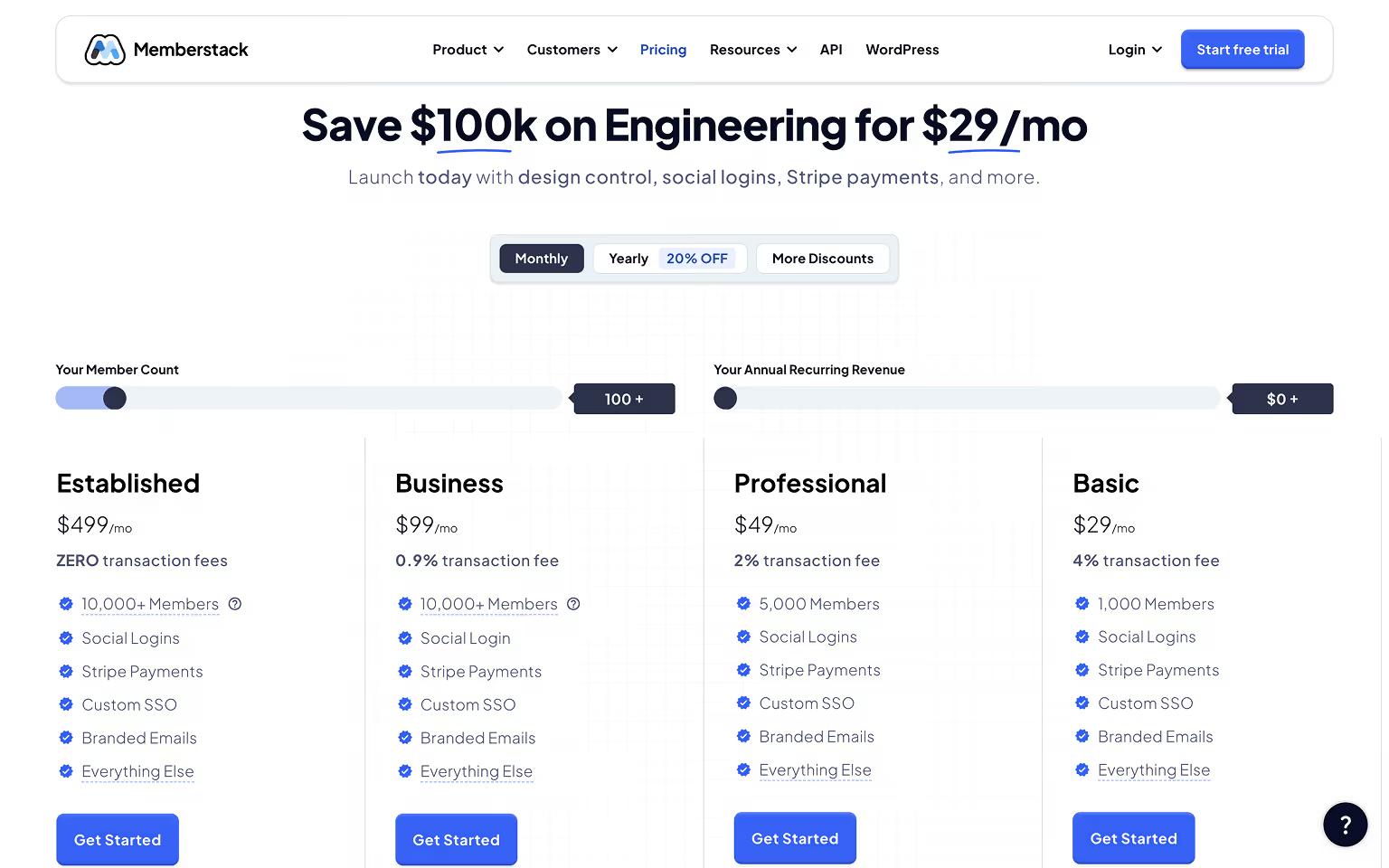
Memberstack Pricing
Understanding Memberstack’s pricing structure is key to choosing the right plan for your project, whether you're building a gated resource hub, a paid SaaS tool, or a subscription-based membership site.
Free Plan
Memberstack offers a Free plan that’s ideal for:
- Testing the platform
- Building out your user flows and gated content
- Launching small internal tools or MVPs
You’ll have access to core features like login, signup, gated content, and user data collection. Stripe and integrations are disabled on this tier, making it best for non-commercial use. If you still need to add Stripe, read our guide on Webflow Stripe integration.
Paid Plans
Once you're ready to go live, you can upgrade to one of the paid tiers. These unlock:
- Stripe integration for one-time payments, subscriptions, and metered billing
- Multiple membership plans and advanced access rules
- Additional user fields, gated CMS logic, and developer tools
- Email support and webhook/API access
Pricing is usage-based, starting with a base monthly fee that increases with the number of active members on your site. This makes it scalable for startups and enterprise use alike.
Which Plan Do You Need?
- Solo creators & small teams: Start with Free, then upgrade when Stripe is needed
- SaaS, marketplaces, and education platforms: Paid plans are a must, especially for automation and CRM workflows
Whether you're just starting or scaling something complex, our team brings the technical know-how and strategic clarity to turn your membership vision into a fully functional platform. From custom logic to seamless plan setup, we’re here to help you build with confidence.
Share the Article

Evgenii Tilipman is the founder of Khod, a digital agency helping B2B tech companies turn their websites into demand-generating assets.
He works closely with founders and GTM teams to define positioning, structure high-converting pages, and build scalable Webflow systems that support growth.
Before founding Khod, Evgenii led Webflow development at an agency and worked with Memberstack to build products for the Webflow community. He has since supported teams from seed to Series C across positioning, conversion, and Webflow development.
Outside of work, he's a husband, dog dad, and someone who treats his health and long hikes with the same consistency he brings to his projects.
Table of Content


Kickstart your project today!
Book a call to discuss your goals and how we can help you reach them.
See Khod First on Google
More Integrations
 GoHighLevel Webflow Integration
GoHighLevel is an all-in-one CRM and marketing platform: pipelines, calendars, email and SMS, and automation workflows, popular with agencies and service businesses.
 Microsoft Clarity Webflow Integration
Microsoft Clarity shows you how visitors behave. We help you connect it to Webflow so you can see every click, scroll, and abandoned form to convert more of your traffic.
 Webflow Shopify Integration
Shopify runs the ecommerce backend. We help you connect it to Webflow, so your site has stronger product pages, clearer buying paths, and the right setup behind the scenes.
Your Next Deal Starts With Your Website
Most deals are won or lost before your sales team gets involved. Let's make sure your site is ready for that moment.
